
What Is Computer Recycling?
Computer recycling is the controlled recovery, reuse, and processing of old computers so their parts, materials, and data are handled safely. It prevents useful components from being wasted and keeps hazardous elements out of the environment.
To understand how the process works, it helps to know the core terms used throughout the industry.
- E-waste: Discarded electronic devices that can be reused, repaired, or recycled.
- Data destruction: Methods used to wipe or physically destroy storage devices.
- Refurbishment: Restoring a workable computer to a usable condition for resale or donation.
- Part harvesting: Collecting components that still have value or can support repairs.
- Downstream processors: Facilities that handle recovered metals, plastics, and circuit materials.
- Certified recycler: A recycling company that follows recognized environmental and data-handling standards.
- Chain-of-custody: The documented path a device follows from drop-off to final processing.
- Asset tag: A label used to track individual devices during intake and reporting.
- Material recovery: Extracting metals, plastics, and minerals for manufacturing use.
- End-of-life devices: Computers too damaged or outdated to repair or refurbish.
- Shredding: Mechanical destruction of drives or hardware to prevent data recovery.
- Compliance reporting: Documentation that proves devices were processed responsibly.
The Step-by-Step Computer Recycling Process
The computer recycling process turns a complex operation into predictable steps so devices are handled safely, sensitive data is removed, and materials re-enter the supply chain.
Below is a full, step-by-step explanation showing what actually happens to your device at each stage.

Step 1: Intake
Intake is the first point of control. Staff confirm who delivered the device, tag items for tracking, note visible damage, and perform a basic function check when safe. Accurate intake creates the chain-of-custody that supports later reporting and certification.
- Log fields recorded: Device type, serial number, owner or account, intake date, visible issues.
- Inspection actions: Look for battery swelling, leaking fluids, missing panels, and obvious contaminants.
- Quick tests: Power on, display check, and basic I/O to determine if the device can be started safely.
- Temporary staging: Place items in labelled bins for the sorting team.
Here are the typical intake log fields you need to remember:
| Field | Purpose |
|
Device type |
Classify for routing |
|
Serial number or asset tag |
Track individual item |
|
Reported owner |
Link to customer account |
|
Condition note |
Hazard or processing flag |
|
Intake timestamp |
Start of chain-of-custody |
Step 2: Sorting
Sorting separates devices into paths that determine cost and handling. A clear sort reduces wasted labor and ensures repairable units are recovered rather than shredded.
- Main categories: Reusable, repairable, part-harvest, end-of-life, hazardous.
- Criteria: Device age, bootability, cosmetic, and electrical condition.
- Physical layout: Separate bays or pallets to prevent cross-contamination of streams.
- Outcome: Assignment to refurbishment, repair queue, disassembly line, or hazardous handling.
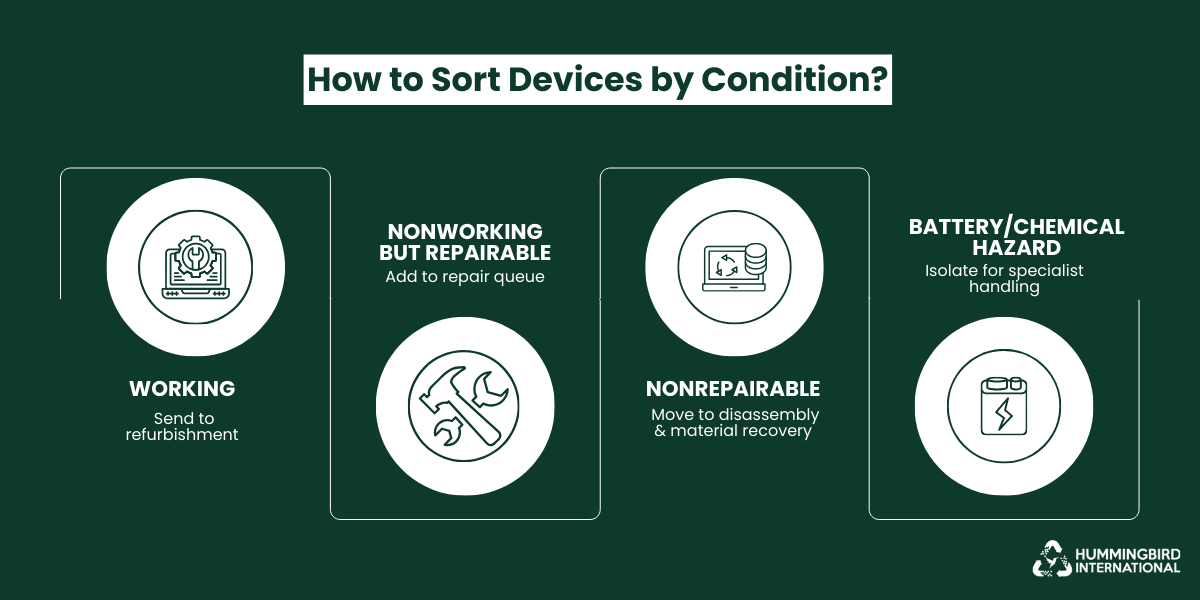
These are common device conditions and how to sort them:
Working machines → refurbishment,
Repairable nonworking → repair queue,
Nonrepairable → disassembly and material processing,
Battery or chemical hazard → isolation and specialist handling.
Step 3: Data Destruction
Data destruction protects privacy and reduces liability. Recyclers follow standardized methods and document each action to get rid of data on old hard drives.

- Logical wiping: Overwrite the storage media using certified software that meets accepted standards.
- Physical destruction: Shred or crush storage devices when wiping is not possible or when the customer requires physical destruction.
- Verification: Generate logs, sample audits, and link destruction records to serial numbers.
- Certification: Provide customers with a certificate of data destruction or a detailed wipe report.
Let’s look at the most common data destruction methods and their use cases.
| Method | Use Case | Proof |
|
Software Wipe |
Functional HDD and SSD | Wipe report with hash or log |
|
Drive Degaussing |
High-sensitivity media | Degauss certificate |
|
Shredding |
Damaged or non-wipeable drives | Shred certificate with serials |
Step 4: Parts Harvesting
Part harvesting extracts usable components to extend device life and reduce demand for new parts. Each recovered component is tested and graded.
- Common recovered parts: RAM, storage drives after sanitization, CPUs, power supplies, LCD panels, keyboards, and fans.
- Testing and grading: Components are bench-tested, labelled with a performance grade, and bagged with test notes.
- Reuse channels: Refurbishment builds, spare parts sales, education, or charity donation.
Harvesting increases circularity and improves the economics of recycling by delivering higher-value streams than raw materials alone.
Step 5: Materials Recycling
Materials recycling reduces non-repairable units to sorted material streams that downstream processors can refine.
- Manual disassembly: Remove batteries, circuit boards, and large metal parts for separate handling.
- Mechanical processing: Shredding followed by separation using magnets, eddy currents, screens, and density methods.
- Material streams: Here’s a detailed look at materials recovered and what happens to them:
| Material | Typical Destination | Common End Use |
|
Steel |
Metal recycler | Frames, brackets |
|
Aluminum |
Smelter | Casings, heat sinks |
|
Copper |
Refinery | Wiring, coils |
|
Plastics |
Polymer | Moulded parts |
|
Printed Circuit Boards (PCBs) |
Refining facility | Precious metal recovery |
- Downstream transfer: Certified processors and smelters receive sorted bales and feedstocks.
Step 6: Reporting
Reporting documents the fate of each item and provides businesses with evidence of compliance with e-waste legislation.
- Chain-of-custody entries show every handoff and process step.
- Data destruction certificates or wipe logs tie to serial numbers.
- Material recovery summaries show weights diverted from landfill and estimated recovery percentages.
- Business customers receive receipts suitable for sustainability reports and audits.
Good reporting is the accountability mechanism that converts recycling activity into verifiable environmental performance.
The Recycling Path of Three Common Hardware
The table below shows what typically happens to devices (laptops, desktops, hard drives) at each step.
| Process Step | Laptop | Desktop | Loose Hard Drive |
|
Intake |
Logged, asset tag, quick power test | Logged, note peripherals, power test | Logged, associated owner, visual check |
|
Sorting |
Likely repairable or part-harvest depending on age | May be repairable or end of life, depending on components | Routed directly to the data destruction team |
|
Data Destruction |
Wipe SSD if present, shred if requested or damaged | Wipe or remove and shred drives, log serials | Immediate wipe or physical destruction, certificate issued |
|
Part Harvesting |
RAM, SSD, screen, and battery (if good) | PSU, RAM, GPU, HDD, and fans harvested and tested | N/A if destroyed; if wiped and functional, may be resold |
|
Materials Recycling |
Battery removed, chassis and plastics sorted, PCB sent to the shredder | Metal chassis, PSU, and boards disassembled and sent to processors | Drive casing and electronics shredded and sent for metal recovery |
|
Reporting |
Certificate of destruction, recovery summary | Full chain-of-custody and recovery metrics | Shred certificate and weight recorded |
Why Computer Recycling Matters Today
The world generated roughly 62 million tonnes of electronic waste
in 2022 — from laptops and desktops to smartphones and cables — yet less than a quarter of that was properly collected and recycled.
That gap matters because every unrecycled device locks away metals, plastics, and other materials — and often allows hazardous substances to leak into the environment. Below are the major reasons why responsible computer recycling is critical today.
The Rise of E-Waste and the Strain on Natural Resources
Global e-waste continues to rise sharply, driven by shorter upgrade cycles and the massive growth of connected devices. What makes this surge notable is how it changes the role of old computers. They are no longer simply discarded office equipment. They now represent one of the largest pools of recoverable metals, plastics, and engineered materials available above ground.
Each generation of devices contains more complex components and more valuable elements, which means waste volumes are rising in both quantity and material density.
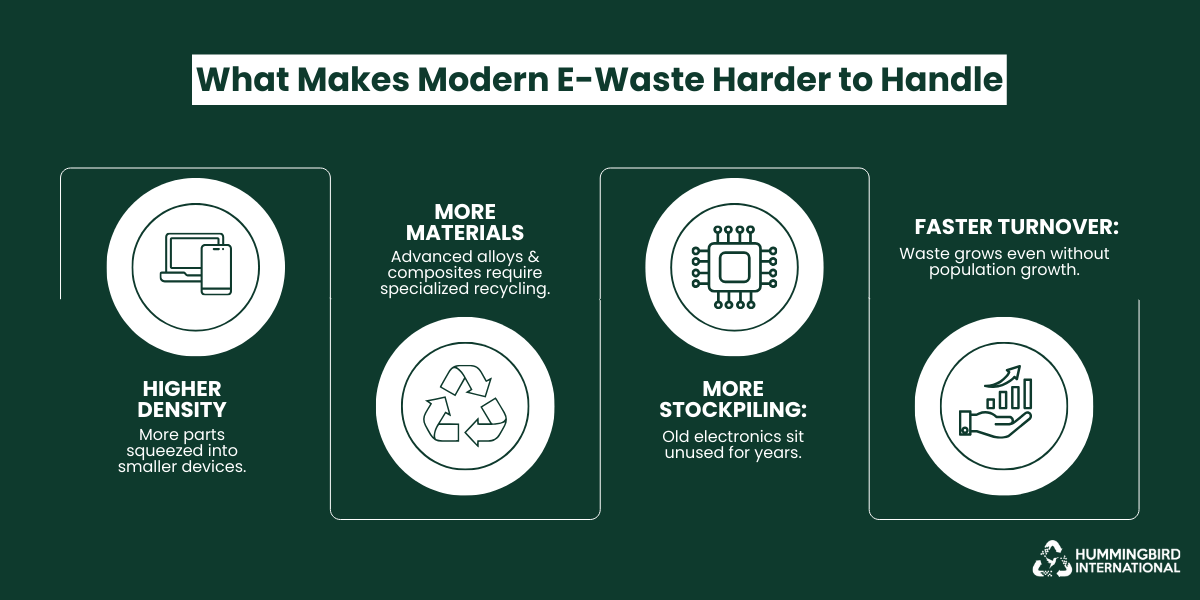
What sets today’s surge apart:
- Newer devices pack more components into smaller spaces, creating denser waste streams than in past decades.
- Modern hardware includes a wider mix of alloys, composites, and micro-materials that require advanced recycling techniques.
- Homes and businesses tend to stockpile old laptops and hard drives longer than other waste types, creating large, untouched reserves of recoverable materials.
- The speed of global device turnover creates a cycle where waste grows even when population growth slows.
These trends make computers one of the most important material resources of the modern era, and the recycling process has become essential not just for environmental reasons but for the practical management of this accelerating waste flow.
The Social Cost of Unsafe Dumping and Informal Disposal
Informal recycling and dumping of old computers and electronic waste often burden entire communities rather than solve the problem. When devices are dismantled in unregulated conditions, hazardous materials escape containment — and those living nearby pay the cost in health, environment, and social stability.
In many countries, the informal sector handles the bulk of e‑waste, despite the dangers. The consequences range from widespread pollution to long-term health risks for workers and residents.
Many well-known informal e‑waste hubs highlight how deep the problem runs.
- Agbogbloshie (Accra, Ghana) — Once among the largest e‑waste dumps globally, informal workers publicly burned and dismantled electronics to extract metals; soil and water contamination, plus serious health risks for locals, have been widely documented.
- Guiyu (Guangdong, China) — Known as the “electronic graveyard of the world,” this town processed massive amounts of discarded gadgets with minimal regulation; the work released toxic dust and heavy metals, impairing local air, water, and resident health.
- Seelampur (Delhi, India) — One of India’s largest informal e‑waste markets, handling thousands of tons of discarded electronics; workers dismantle and extract components without safety gear, while local residents risk exposure to hazardous substances.
Recognizing this social cost is a key reason why proper, certified recycling matters — not just for materials, but for people and communities too.
Responsible Consumption and “Cleaner America” Goals
The idea behind a “cleaner America” centres on reducing pollution, protecting soil and water, and strengthening domestic material recovery so the country depends less on hazardous extraction. In the context of computers, this goal relies heavily on how devices are used, stored, and finally retired.
Responsible consumption encourages longer product lifecycles, careful disposal, and stronger recovery of metals already in circulation. These practices support national sustainability plans that aim to limit landfill pressure and reduce exposure to toxic components from discarded electronics.
Key points that show how responsible use ties directly to the Cleaner America objectives include:
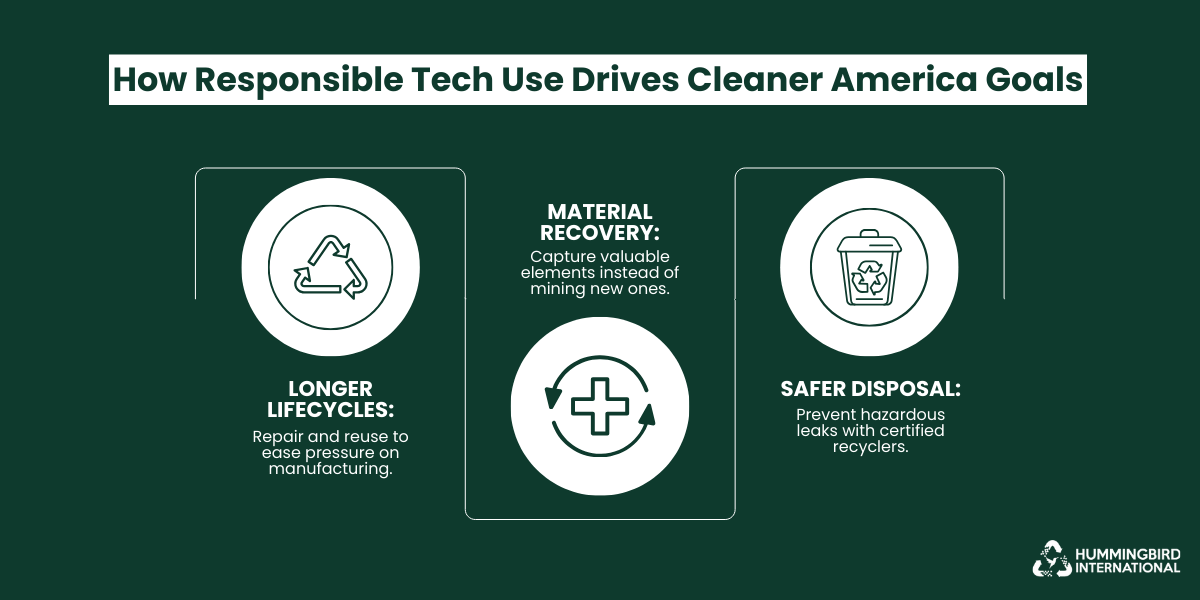
- Longer device lifecycles (repair, refurbish, second-life use) to ease strain on manufacturing.
- Recover valuable materials to reduce dependence on mined virgin resources.
- Lower hazardous leakage via better disposal standards and certified processing.
Certified IT Recycling as a Trust Signal for ESG Reporting
Modern sustainability reporting expects firms to prove how they manage electronic waste, not simply state that equipment was “disposed of responsibly.” Certified IT disposal gives companies that proof. It provides documented tracking, verified data destruction, and audited recycling routes, which together create a clear record that equipment was handled without harm to the environment or local communities.
For many organizations, this assurance supports broader goals:
- Accurate ESG disclosures, since certified ITAD partners supply measurable recovery rates and recycling outcomes.
- Lower environmental exposure, with hazardous components routed through approved downstream processors.
- Better resource efficiency, as firms recover value from old assets and often monetize IT assets instead of sending them to storage or landfill.
With a certified ITAD partner, businesses strengthen their environmental profile and demonstrate that their technology footprint is managed with care.
The Wider Global Crisis of E-Waste Mismanagement
The volume of discarded electronics has outgrown the capacity of most national waste systems. Many countries still lack the infrastructure to collect and treat modern streams of laptops, desktops, and peripherals, leaving large quantities stored, exported, or dismantled in unsafe conditions.
This breakdown wastes valuable materials that could be recovered to monetize retired IT assets, while exposing communities to long-term environmental harm.
Key patterns show how the crisis is expanding:
-
Global volumes are rising faster than treatment capacity.
The UN projects e-waste to reach 82 million tonnes by 2030, yet only a small share enters documented recycling.
-
Unregulated exports remain common.
Electronics continue moving to regions with weak oversight, where burning and acid stripping release toxic by-products.
-
Escalating “invisible waste.”
Millions of devices sit unused in homes and offices, delaying material recovery and amplifying storage risks.
The global crisis reflects an urgent need for stronger collection systems, certified processing, and responsible IT recovery that protects communities while keeping valuable resources in circulation.
Real-World Impact: Computer Recycling in Action
Seeing how major tech companies manage their old computers gives a clear picture of what effective recycling looks like. These examples show practical ways devices are reused, recycled, and turned into new materials, while also highlighting the positive impact on the environment.
-
Dell: Closed‑Loop Plastics and Computer Recycling Programme
Dell is a global PC and server manufacturer. Through its formal recycling initiative, it accepts returned end‑of‑life computers and recovers materials — in many cases, reusing them in new devices.
Business Challenge
Dell faced two major challenges:
- 1. The environmental and regulatory pressure from growing e‑waste worldwide.
- 2. The rising cost and environmental impact of virgin plastics used in computer housings and components.
The company needed a sustainable solution that would allow it to both reduce waste and stabilize material supply.
The Solution
The company implemented formal collection programs for returned devices, followed by secure data destruction, component recovery, and recycling of materials. Plastics and metals were processed and reused in new device manufacturing, closing the loop on material use.
The Result
Through its closed-loop recycling programme, Dell transformed plastics recovered from returned computers into nearly 5,000 tonnes of recycled plastic for new devices, reducing the carbon footprint of those components by approximately 11% compared with virgin materials.
Over the years, this initiative has diverted thousands of tonnes of e‑waste from landfills globally, ensured a consistent supply of high-quality recycled materials, and demonstrated that computer recycling can directly support both environmental goals and manufacturing efficiency.
-
HP: Circular Use of Recycled Materials and Computer Recycling
HP, a major global technology firm, extended its sustainability work beyond cartridges to computer hardware and electronics. It has incorporated recycled plastics and materials from returned electronics into its new products, aiming for a circular‑economy model across both computers and accessories.
Business Challenge
As e‑waste grew and regulatory expectations rose, HP faced the dual pressures of managing retired devices responsibly and finding sustainable sources for plastics and metals. The traditional model — using virgin plastics and new materials — increasingly conflicted with environmental concerns and consumer demand for greener products.
The Solution
HP set up formal collections and take‑back channels for returned devices, then established a closed‑loop recycling system. This system separated plastics, metals, and other materials for reuse. Recovered plastics (post‑consumer or post‑use) were reintroduced into manufacturing. In some of its laptops and hardware, recycled plastics and metals now make up a significant portion of the material content.
The Result
HP’s efforts yielded measurable gains: by 2020, certain computers — like the HP Elite Dragonfly — included mechanical components in which over 82 % of the weight came from recycled materials. Recycled plastic from returned hardware and cartridges helped reduce reliance on virgin plastics. Over time, this approach decreased environmental impact and diverted substantial amounts of e‑waste from landfills.
-
Lenovo: Integrating Recycling and Circular Design in PCs
Lenovo, a global PC manufacturer, has committed to embedding post-consumer recycled plastics, recycled metals, and other recovered materials into its laptops, desktops, and accessories. It also runs take-back programmes that allow devices to be returned for refurbishment or recycling.
Business Challenge
Faced with growing e-waste, regulatory pressure, and the environmental impact of sourcing virgin materials, Lenovo needed a sustainable approach that reduced waste and integrated recycled content into its products.
The Solution
Lenovo incorporated recycled plastics and metals into device components and packaging, while operating take-back and Asset Recovery Services to securely collect old devices for refurbishment or recycling. This closed-loop approach ensures that materials from retired devices re-enter the supply chain rather than being discarded.
The Result
Since 2005, Lenovo has used over 130 million kilograms of recycled plastics in its products and packaging. By 2022/23, approximately 300 PC products included closed-loop recycled content, including aluminium, magnesium, recycled steel, and post-consumer copper.
Returned hardware is systematically processed, reducing landfill waste and feeding usable materials or refurbished devices back into circulation. These efforts demonstrate how circular design and computer recycling can simultaneously cut environmental impact and extend material use.
Summing Up
Recycling old computers is no longer a side task. It’s part of how we protect local communities, recover useful materials, and handle technology with a bit more care. If you’re looking for a straightforward way to clear out aging equipment without creating more waste, Hummingbird International LLC can take it from here through its computer disposal service.
FAQs
1. What will happen to my old computer?
It goes through a structured treatment path. A certified recycler collects the device, sorts it by type, wipes or destroys all data, removes reusable parts, and then breaks down the remaining materials for metal, plastic, and glass recovery. Anything hazardous is sent to approved downstream processors. You receive a report confirming how the device was handled.
2. What is the difference between recycling and refurbishing?
Refurbishing keeps a device in use for longer. A computer is inspected, repaired, fitted with replacement parts if needed, and then resold or redeployed.
Recycling is different. It focuses on dismantling the device, removing data-bearing components, harvesting usable pieces, and processing the rest into raw materials.
Refurbishing preserves the whole device, while recycling extracts value from its individual parts.
3. Which computer parts can actually be recovered or reused?
Many components hold strong reuse or material value. Common recoverable parts include:
- Hard drives and SSDs, once wiped or shredded.
- RAM, power supplies, cooling fans, and other functional modules.
- Screens, keyboards, and casings, if they remain in good condition.
- Metals such as aluminium, copper, gold, palladium, and steel, recovered during shredding and separation.
These recovered parts strengthen circular supply chains and reduce the need for new resource extraction.
4. Do I need to wipe my device before sending it to a recycler?
With a certified ITAD or recycler, wiping isn’t required, as they securely erase or destroy all data. Many users still choose to delete personal files for peace of mind. Certified partners provide documentation confirming the safe destruction of data.
5. Can businesses track and verify how their computers were recycled?
Yes. Certified ITAD partners provide detailed reports and certificates showing each device’s journey — from data destruction to parts recovery and final recycling. This allows businesses to verify compliance, demonstrate sustainability efforts, and monetize retired IT assets where applicable.


Leave a Reply