When organizations upgrade systems and replace employee hardware, thousands of devices leave corporate environments every year. Many businesses rely on basic data wiping methods and assume those devices are now safe for resale, recycling, or disposal. That might not always be correct. A device labeled as ‘wiped’ may still fail an audit if verification logs are missing, chain-of-custody records are incomplete, sanitization attempts fail, or disposal procedures are inconsistent. Proper ITAD practices protect sensitive data and help organizations maintain regulatory compliance.
Let’s explore why wiped devices fail to meet IT audit standards and how certified providers help businesses avoid these issues.
- What To Know About Device Wiping and Compliance?
- When Should You Wipe or Shred a Retired SSD?
- Key Factors that Cause Devices to Fail IT Audit Standards
- Compliance Standards Businesses Need to Meet
- How Certified ITAD Providers Prevent Audit Failures?
- Combine Reuse, Wiping, and Destruction Safely
- Employee Training and Internal Awareness
- Get Audit-Ready IT Asset Disposal
- Frequently Asked Questions
What To Know About Device Wiping and Compliance?
The latest IT compliance standards require far more than simply deleting files or running a basic wiping tool. Auditors expect businesses to prove that sensitive data was securely sanitized using verified, documented, and repeatable processes. Many organizations believe that once a device has been wiped, it is automatically safe to recycle, resell, or remove from inventory. But such assets can fail an audit even after being wiped if the organization cannot provide evidence showing how the sanitization was performed, its success, and who handled the device throughout the disposal process.
This is where, as a business owner, you may face compliance gaps. To avoid such issues, you need to consider secure IT asset disposition. The process is no longer just about removing data. It involves risk management, regulatory compliance, chain-of-custody controls, and certified reporting.
Why Data Wiping Alone Is Not Enough
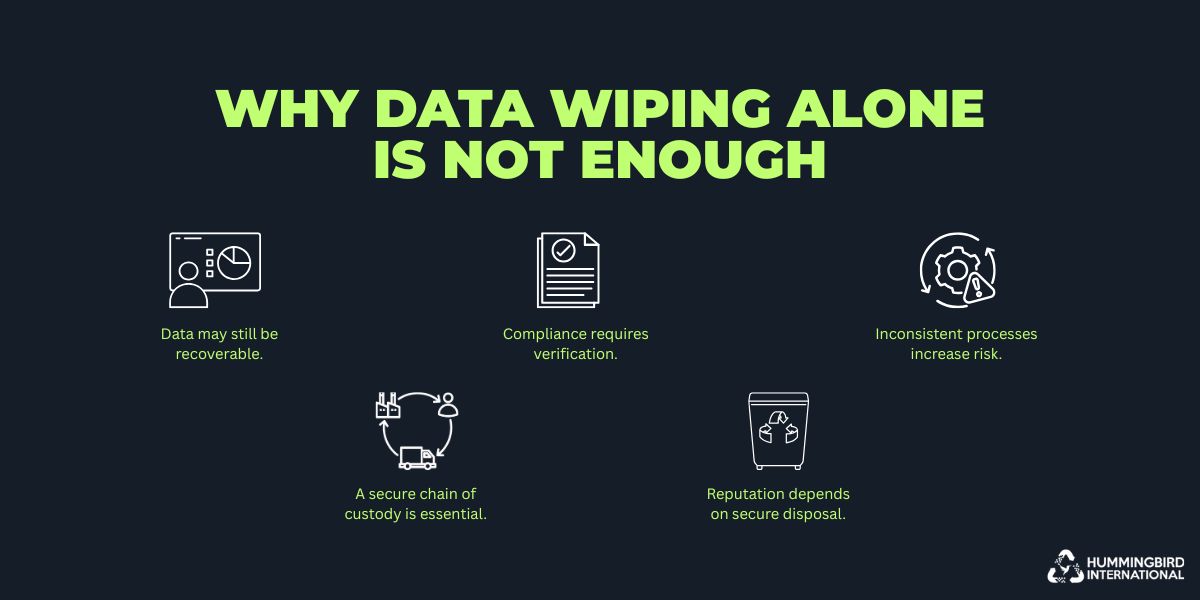
A device wipe may remove visible data, but it doesn’t always eliminate risk. Almost all regulations require organizations to log how sensitive information can never be recovered. Without the right safeguards, retired IT assets intended for monetization can still pose data exposure risks and unexpected audit challenges. Let’s consider some of the factors why simply wiping it is not enough.
-
Data can still be recovered.
Basic wiping methods may remove files from view. Despite that, advanced recovery tools can sometimes retrieve residual data. Without certified sanitization techniques, sensitive business information may remain accessible.
-
Compliance Requires Proof
Regulations and industry standards demand documented evidence of secure data destruction. Simply wiping a device is not enough if there is no verification or audit trail to support compliance.
-
Inconsistent Processes Create Risk
When organizations rely on manual or non-standardized wiping methods, the results can vary from device to device. A single overlooked asset can lead to security breaches or failed audits.
-
Chain of Custody Matters
Devices pass through multiple hands during disposal or recycling. Without a secure chain-of-custody process, businesses lose visibility and control over where their sensitive data ends up.
-
Reputation is on the line.
A data leak from improperly sanitized devices can damage customer trust and brand credibility. Secure, verified data destruction helps protect both sensitive information and business reputation.
The Misconception around ‘Deleted’ or ‘Wiped’ Devices
It’s a common belief that deleting files or formatting a hard drive permanently removes confidential information. Many standard deletion methods only remove access to the data and do not completely destroy it. With the right recovery tools, devices may have hidden files, credentials, customer information, or internal business records. This could also lead to cybersecurity risks associated with e-waste.
Even when organizations use wiping software, problems can still occur. Incomplete overwrite cycles, corrupted sectors, hidden partitions, or unsupported storage technologies can leave data intact. Employees may also be unaware of verification steps or rely on manual processes that are difficult to track and audit consistently.
Businesses assume a device is compliant simply because it has been marked as wiped internally. But auditors require that they meet standards such as NIST SP 800-88. Without verification, a wiped device has a certain risk.
Another issue is the lack of standardization across organizations. Different departments may use different wiping methods, tools, or disposal procedures. Some devices may undergo certified sanitization, such as under the R2v3 erasure protocols, while others may simply be reset or reformatted before being discarded. These inconsistencies make it difficult for businesses to track their wiped inventory.
| Issue / Misconception | Explanation | Potential Risk |
| Deleted files are permanently removed | Standard deletion or formatting methods often only remove access to the data rather than destroying it completely. | Sensitive information can still be recovered using data recovery tools. |
| Hidden data remains on devices | Devices may still contain hidden files, credentials, customer information, or internal records after deletion. | Exposure of confidential business data and cybersecurity risks tied to e-waste. |
| Wiping software is not always foolproof | Incomplete overwrite cycles, corrupted sectors, hidden partitions, or unsupported storage technologies may leave data intact. | Residual data may remain accessible even after a wipe process. |
| Lack of verification processes | Employees may skip verification steps or rely on manual processes that are difficult to audit consistently. | Increased risk of human error and inability to prove compliance. |
| Assumption that “wiped” equals compliant | Businesses may internally mark devices as wiped without validating against standards like NIST SP 800-88. | Audit failures and ongoing risk of recoverable data. |
| Inconsistent sanitization methods | Different departments may use different wiping tools, methods, or disposal procedures. | Difficulty tracking inventory and maintaining standardized security practices. |
| Devices are reset instead of sanitized | Some devices may only be reformatted or factory reset instead of undergoing certified sanitization under protocols like R2v3. | Data may still exist on the device and remain recoverable. |
| Poor inventory tracking | Inconsistent disposal and wiping procedures make it difficult to monitor wiped devices across the organization. | Reduced accountability, compliance gaps, and security vulnerabilities. |
Difference Between Basic Wiping and Audit-Ready Sanitization
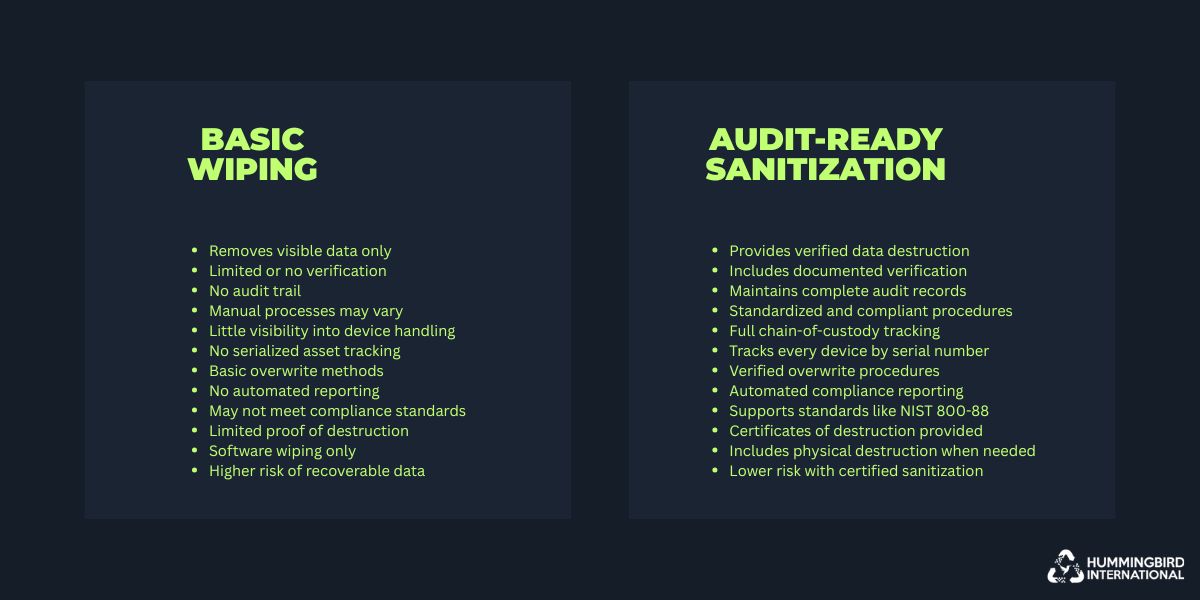
The basic process focuses on just removing data from a device. Audit-ready sanitization means the destruction is verifiable. There’s quite a difference between the two, and it matters when regulators or internal auditors start asking questions. The process has to include serialized asset tracking, verified overwrite procedures, automated reporting, chain-of-custody logs, and certificates of destruction.
All of those records working together tell a clear story. Every device was handled securely from the moment it was collected to its final disposition. Auditors want to see consistency through the entire process. Was a formal ITAD policy followed? Were approved destruction methods used? Are employee responsibilities clarified? If any of that is missing or out of compliance, a company can find itself going through problems even if there was never an actual security breach.
Failed drives, damaged storage media, and certain SSD technologies could require physical destruction since software-based wiping cannot guarantee complete removal. Certified providers assess these risks and determine the safest disposal method. They maintain IT compliance, taking into account the device’s condition and the sensitivity of the data.
Learn more: A Complete Hard Drive Disposal Guide
When Should You Wipe or Shred a Retired SSD?
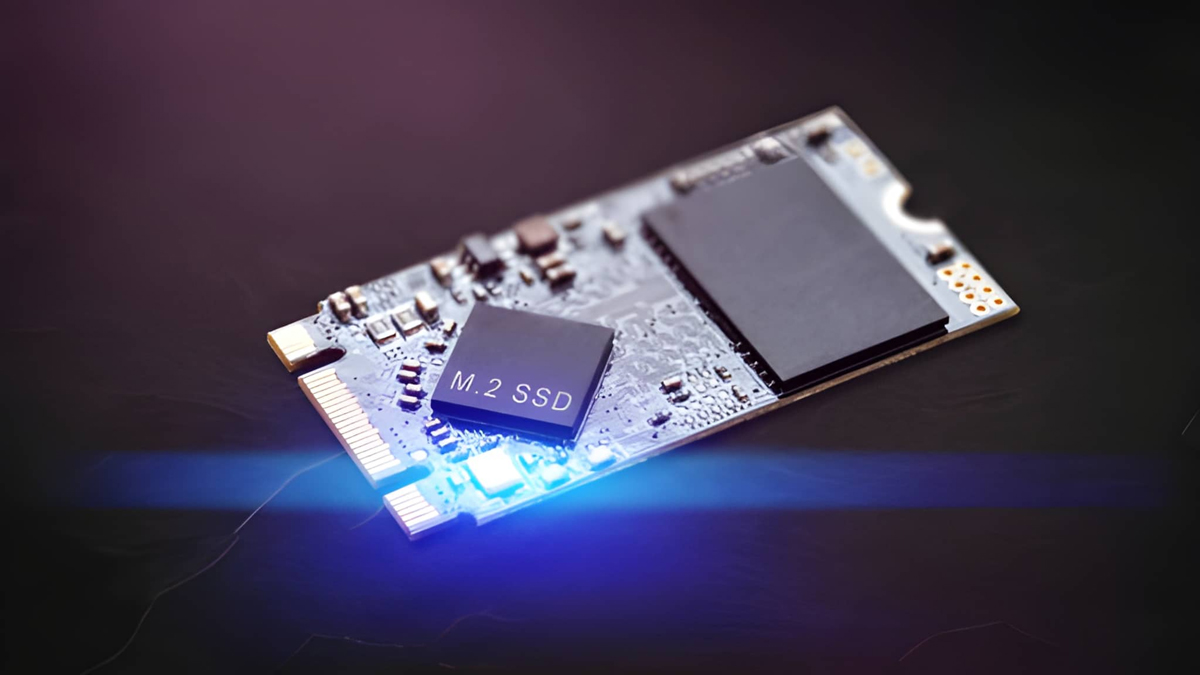
Image Source: iStock/Enis Aksoy
While it is possible to delete files and send the SSD for recycling, this is not a sufficient measure for retired SSDs. The appropriate sanitization technique will be determined by the state of the SSD, the data on the SSD, the technology used, and the post-sanitization actions taken.
1. Wipe the SSD when it is functioning and suitable for reuse.
If the SSD is healthy and the organization has plans for reuse, resell or redeploy, a validated sanitization process might be suitable. The method should comply with a standard (such as NIST SP 800-88) and be based on the storage technology used. Following sanitisation, the organisation should re-check the sanitisation and keep the sanitisation record indicating the asset identified and the method and outcome of sanitisation.
2. Shred the SSD when reliable sanitization is not possible.
In cases of physical damage, failure, inaccessibility, or inability to sanitize an SSD reliably, physical destruction may be required. It might also be appropriate if the organization’s policy is to destroy due to the sensitivity of the information on the device. SSD shredding disrupts the storage media physically which means the device cannot be reused and it is too difficult to recover the data.
3. Consider the SSD’s storage technology.
Unlike conventional hard disk drives, SSDs store data in a different manner. They have inbuilt controllers that implement different techniques which include wear leveling, which is able to map the data to various memory locations. Thus, a traditional overwrite method may be unsuitable for all SSDs. Instead of applying the same process to all storage devices, IT teams should determine the type of device and the sanitization method that works best for that technology.
4. Match the method to the asset’s final disposition.
The goal also is important. If an SSD is being returned to service, then a sanitization method must be used that leaves the device operational. If there is not a method of successfully sanitizing the data, then the destruction of an SSD that is being permanently retired may be better.
5. Document the decision.
Regardless of the method used, the organization should document the reasons for selecting it and the way it was undertaken. Each retired SSD has an auditable record due to Asset ID/s, sanitization results, processing dates, verification records and destruction documentation.
The basic principle is to wipe when the device is known to be in use and can be sanitized and reliably reused, and shred when the device cannot be sanitized and is known to be in use (or if sanitization cannot be reliably achieved, then shred it). A documented decision process will ensure that data is kept safe while any equipment that still has value will not be unnecessarily destroyed by the IT team.
Key Factors that Cause Devices to Fail IT Audit Standards
As regulations become stricter and cybersecurity threats continue to grow, organizations need to consider IT asset disposition as a key operational process. Now, it can be easy to miss this, which is why your business might be flagged for failing to meet audit standards. Here are some of the most common causes of audit failures so you can eliminate them beforehand and reduce risk.
1. Missing Chain-of-Custody Documentation
Image Source: iStock/Enis Aksoy
Devices fail IT audits as there is no documented chain of custody. Such records track every stage of the disposal process, from collection and transportation to sanitization and final destruction or resale. Without these, organizations cannot prove who handled the device, where it was stored, or if it was exposed to unauthorized access.
Auditors view undocumented transfers as a major security risk since devices containing sensitive information may pass through multiple employees, departments, or third-party vendors. Poor chain-of-custody practices also increase the risk of lost or stolen assets. A misplaced laptop, failed hard drive, or improperly tracked storage device can create serious liability if company information is later recovered.
Maintaining serialized asset tracking and documented handoffs helps businesses establish accountability and reduce exposure during audits.
2. Lack of Verification Logs and Certificates

Image Source: iStock/Enis Aksoy
Companies need to keep proof that the sanitization process was completed successfully and in accordance with recognized standards. This is why verification logs and Certificates of Destruction (CoD) play such an important role in secure ITAD programs.
Mostly, it’s a record of serial numbers, timestamps, sanitization methods used, and confirmation that the wipe passed verification testing. Without these, businesses may struggle to prove that data destruction was successful. The certificates are required in regulated industries such as healthcare, finance, education, and government. If missing or incomplete, serious concerns can be raised during audits, as it highlights weaknesses in the organization’s disposal process.
Many businesses fail audits because documentation is scattered, inconsistent, or unavailable when requested. This can be avoided by centralizing all records and making them accessible for compliance reporting.
3. Inconsistent Data Destruction Methods
Image Source: iStock/Enis Aksoy
Some teams rely on software-based wiping, and others go for factory resets, manual deletion, or physical destruction for hard drive disposal without guidelines. These inconsistencies make it difficult to maintain a reliable disposal process. Auditors expect organizations to follow clearly defined policies that outline approved sanitization methods based on device type, data sensitivity, and regulatory requirements.
When employees use different tools or procedures, it could lead to incomplete data removal or improper handling of retired assets. It’s also important to keep in mind that devices may be processed according to location, department, or vendor. And that could create further compliance problems if methods are inconsistent.
Organizations that lack formal policies may also struggle to scale compliance efforts as their infrastructure grows. With repeatable workflows and improved accountability, there is less chance of an audit failure.
4. Failed or Corrupted Drives

Image Source: iStock/Enis Aksoy
Damaged hard drives, corrupted storage sectors, and aging hardware may prevent wiping tools from accessing or overwriting all stored data. This means that confidential information could be recoverable even after a wipe attempt is completed. Solid-state drives (SSDs), especially regarding the proper disposal of hard drives, present additional challenges because data is stored and managed internally. Features such as wear leveling and hidden memory blocks can make it difficult to guarantee complete overwriting using traditional techniques.
So organizations might return the drives without a guarantee that their data is secure. When they fail verification testing or cannot be reliably sanitized, physical destruction is the safest and most compliant option. Certified shredding, crushing, or degaussing methods help ensure that damaged or corrupted devices are processed properly.
Auditors expect businesses to identify failed sanitization attempts and document the actions taken to prevent those.
5. Improper Asset Inventory Management

Image Source: iStock/Enis Aksoy
When inventory records are incomplete or outdated, auditors may identify the irregularities between the organization’s asset database and the devices processed for disposal. Missing serial numbers, undocumented hardware transfers, or untracked storage devices create uncertainty about how the data is handled. A small inventory mismatch can be flagged and used to show inefficiency in the company’s overall IT asset management practices.
Old laptops, backup drives, mobile devices, or network equipment may sit in storage rooms or employee offices for years without proper sanitization or tracking. These assets can become major security liabilities if they have business or customer data. To prevent such problems, it’s a good idea to implement centralized asset tracking systems. Regular inventory audits can also help maintain compliance.
Compliance Standards Businesses Need to Meet
IT audits focus heavily on how businesses can implement secure, verifiable sanitation practices. This includes maintaining documented processes, adhering to recognized destruction standards, and working with certified IT asset disposition (ITAD) providers as needed. To understand this better, it’s a good idea to become familiar with the compliance standards, such as IT asset disposal regulations in Pennsylvania, that must be met.
1. NIST SP 800-88 Guidelines
This provides guidelines for securely removing data from storage devices to minimize the risk of unauthorized recovery. NIST Special Publication 800-88, developed by the National Institute of Standards and Technology, is key to avoiding audit failures.
It categorizes sanitization into three primary methods: clear, purge, and destroy. The right method depends on the sensitivity of the data, the condition of the device, and if the hardware will be reused, resold, or permanently discarded.
Clear
The method focuses on removing data using standard overwrite techniques or device reset procedures. It’s used when devices will remain within the organization or be repurposed internally. Clearing reduces access to data, but it may not fully protect against advanced recovery methods if verification is weak.
Purge
This adds a higher level of protection by using advanced sanitization techniques such as cryptographic erasure or specialized overwrite methods. Purging makes data recovery quite difficult, even with sophisticated tools. It is a method commonly used before devices are remarketed, recycled, or transferred outside the organization.
Destroy
It includes shredding, crushing, or degaussing hard drives and storage devices. Physical destruction, on-site and off-site, is sometimes required for failed drives, highly sensitive data, or devices that cannot be sanitized reliably through software-based methods.
Organizations are expected to confirm that sanitization processes were successful and maintain records.
2. HIPAA for Healthcare
Medical records, billing information, insurance data, and patient communications stored on retired devices must be securely removed before the hardware is reused or discarded. The Health Insurance Portability and Accountability Act (HIPAA) requires healthcare organizations and their partners to protect patient information during device disposal.
Failure to properly dispose of healthcare-related data can result in severe penalties, breach notifications, and reputational harm. Auditors examine documented disposal policies, chain-of-custody records, and verified destruction reports closely.
3. SOX and GLBA for Financial Organizations
Financial institutions are required to follow strict regulations governing the protection of customer and corporate financial data. Both the Sarbanes-Oxley Act (SOX) and the Gramm-Leach-Bliley Act (GLBA) require organizations to guarantee the protection of consumer data.
Improper disposal of storage devices containing financial records, tax or banking information can expose organizations to legal liabilities. Financial auditors expect businesses to avoid these and meet all the regulatory standards.
4. GDPR and CCPA for Consumer Data
These laws require organizations to manage data responsibly and prevent unauthorized access, including during asset disposal. Retired devices containing customer names, contact information, payment details, or online account data must be sanitized securely before leaving the organization. Businesses that fail to protect personal information during disposal may face fines, legal claims, and damage to consumer trust.
Companies must show with documentation that personal data was handled securely and destroyed according to established processes.
5. Government and Public Sector Requirements
Organizations in these sectors handle highly sensitive information related to citizens, infrastructure, defense, or public operations. So they have to follow strict disposal regulations and detailed security standards.
Public sector audits require serialized asset tracking, controlled transportation procedures, verified sanitization methods, and physical destruction protocols for certain categories of data. Many government organizations also require ITAD vendors to maintain certifications such as:
- R2v3
- ISO 27001
- NAID AAA
These make sure that government organization retired IT assets were handled properly and that secure downstream recycling practices were followed.
How Certified ITAD Providers Prevent Audit Failures?
As compliance standards become stricter and cybersecurity risks continue to grow, businesses can no longer rely on informal or inconsistent disposal practices. Certified IT asset disposition (ITAD) providers help organizations manage retired technology securely and maintain compliance with industry regulations and audit requirements.
This also reduces operational burden as businesses gain access to specialized expertise, documented procedures, and industry-recognized compliance frameworks that help prevent audit failures.
• R2v3 and ISO Certifications
Auditors and regulatory bodies focus on how organizations meet recognized industry standards for data security, environmental responsibility, and operational controls. And vendors are required to hold the relevant certifications. One of the most important in the ITAD industry is R2v3 (Responsible Recycling). This covers electronics recycling, data sanitization, downstream vendor management and safety practices.
Providers with R2v3 certification follow documented processes and undergo regular third-party audits to maintain compliance as well.
ISO certifications also show that an ITAD provider operates according to internationally recognized management and security standards. Common ones include:
- ISO 27001 for information security management
- ISO 14001 for environmental management practices
- ISO 9001 for quality management systems
Businesses that work with certified ITAD vendors gain additional assurance that devices are handled responsibly and securely.
• Secure Chain-of-Custody Procedures
When devices move between locations without proper oversight, that can be quite challenging. Certified ITAD providers reduce this risk by implementing chain-of-custody procedures that track every asset from pickup through final disposition. This process typically begins with serialized asset tracking at the point of collection. Each device is logged, labeled, and documented before transportation begins. Providers may use:
- Barcode and RFID tracking systems
- Tamper-evident packaging
- Secure transportation vehicles
- Authorized personnel verification
- Real-time inventory management systems
- Controlled storage environments
Secure chain-of-custody controls help businesses prove that devices were never exposed to unauthorized access during handling or transit. This level of accountability is especially important for businesses. They can provide auditors with detailed records showing when devices were collected, who handled them, which methods were used, and the final status.
• Audit-Ready Evidence Reports
Documents must show that proper sanitization procedures were followed for every retired asset. And working with professional services is the best way to meet this requirement. They deliver comprehensive, audit-ready reports like
- Certificates of Destruction (CoD)
- Write verification reports
- Serialized inventory lists
- Chain-of-custody documentation
- Transportation and logistics records
- Timestamped processing logs
- Destruction photos or video verification
- Recycling and downstream vendor reports
Details may include overwrite methods used, serial numbers, processing dates, and confirmation that no recoverable data remained on the device. Centralized and organized documentation simplifies the audit process significantly.
Instead of searching through scattered records or relying on manual spreadsheets, businesses can quickly produce verified evidence of compliance when requested by regulators, customers, or internal auditors.
Combine Reuse, Wiping, and Destruction Safely
Not every retired device needs to be physically destroyed. Many assets can be securely sanitized, refurbished, and remarketed to recover residual value, with their data completely wiped. ITAD providers help businesses determine which devices can be reused safely and which require destruction.
For functioning devices, certified sanitization processes allow businesses to support sustainability goals and also extend the lifecycle of technology assets. This balanced approach allows businesses to reduce environmental waste, recover financial value from retired equipment, and be compliant with standards.
Employee Training and Internal Awareness
Policies can fail if employees do not understand how to follow them properly. Many audit issues occur when staff members are unaware of approved disposal procedures, use inconsistent sanitization methods, or fail to document retired assets correctly. Certified ITAD services help organizations with internal awareness for compliance by supporting employee training.
Without this, retired devices could be stored improperly, or verification steps might be skipped. These mistakes can create compliance gaps that go unnoticed until an audit or a security breach occurs. Building awareness across IT teams, operations staff, and department managers helps organizations control their asset disposal processes.
Professionals also help businesses create scalable workflows and internal policies that employees can follow across all locations. This improves operational accountability and reduces the likelihood of audit failures.
Get Audit-Ready IT Asset Disposal
Businesses need structured, standards-based IT asset disposition that protects sensitive information and also supports long-term compliance. Working with a certified ITAD provider like Hummingbird International helps businesses with secure data destruction, serialized asset tracking, audit-ready reporting, and environmentally responsible recycling practices. Protect sensitive data, maintain compliance, and manage retired technology effectively.
Frequently Asked Questions
Why can a wiped device still fail an IT audit?
Why can a wiped device still fail an IT audit?
This happens if the organization cannot provide proof that the data was securely sanitized according to recognized standards. Missing verification logs, incomplete chain-of-custody records, inconsistent disposal methods, or failed wipe attempts can all create compliance issues during an audit.
Should I delete data or choose secure data sanitization?
Deleting data or formatting a drive only removes access to files, but the data may still be recoverable. Secure data sanitization uses verified methods such as overwriting, cryptographic erasure, or physical destruction to make sure sensitive information cannot be recovered.
Why is documentation important in IT asset disposal?
It provides evidence that devices were handled, transported, sanitized, and destroyed securely. Auditors require records such as Certificates of Destruction, wipe verification reports, and serialized asset tracking logs to confirm compliance with data protection regulations.
When should a device be physically destroyed instead of wiped?
When they fail sanitization verification, contain highly sensitive data, or have damaged or corrupted storage media that cannot be securely wiped. Physical destruction makes sure the data cannot be recovered from the device.
How does certified ITAD support sustainability goals?
They help businesses reduce electronic waste by securely refurbishing and remarketing reusable devices whenever possible. This extends the lifecycle of technology assets, supports circular economy initiatives, and makes sure retired electronics are recycled responsibly.