Your laptop e-waste cleanout has to cover inventory, data protection, collection, reuse or recycling decisions, compliant processing and documentation. It’s important to track every device from employee handoff through final disposition. Companies need to consider data security, asset tracking, equipment ownership, potential reuse, and responsible e-waste recycling.
If you’re clearing out a few dozen laptops or planning a full-office e-waste pickup, our guide with a checklist can help your team stay organized and avoid common disposal mistakes.
What Counts as Business Laptop E-Waste?
It includes a range of IT equipment collected over time, like devices that are obsolete, damaged, no longer supported, or simply no longer needed.
A business laptop clearing targets:
- Old or obsolete laptops — Devices that can no longer support the software, operating systems or business requirements
- Damaged laptops — Cracked screens, damaged keyboards, broken ports, liquid damage
- Non-working laptops — Equipment with no power or is uneconomical to repair
- End-of-life laptops — Have reached the end of their useful service life
- Laptop batteries — Removable or built-in batteries that require appropriate handling during e-waste processing
- Laptop chargers and power adapters — Accessories left behind after equipment upgrades
- Docking stations — Collected when employees are issued new computers or office setups change
- Monitors and displays–External screens replaced during office technology upgrades
- Keyboards or accessories — Small devices that can take up space in storage rooms and IT departments
- Cables and adapters — HDMI, DisplayPort, USB, power and networking cables that are no longer required.
One of the best ways to get rid of these is an enterprise recycling program, but there are other options you can think of too.
Every Old Laptop Does Not Need Recycling
Before sending equipment directly for recycling, businesses can categorize devices according to their condition and potential next step:
| Equipment condition | Potential disposition |
| Fully functional and relatively current | Reuse or redeployment |
| Functional but no longer needed | Refurbishment, resale or donation |
| Repairable | Refurbishment |
| Damaged but containing recoverable components | Recycling/material recovery |
| Beyond economical repair | Responsible recycling |
| Device containing sensitive data | Data sanitization or destruction before final disposition |
When Should a Business Consider an E-Waste Cleanout?
There is no fixed time for this as it can be driven by different factors. Businesses don’t necessarily need to wait until a storage room is overflowing with retired equipment. The right decision depends on some key factors such as:
Office relocation
Moving offices is an ideal opportunity to identify equipment that has been sitting unused. Instead of transporting obsolete laptops and electronics to the new location, businesses can inventory and process them for e-waste pick up before the move.
Hardware refresh
Companies replace laptops and other IT equipment as part of a technology upgrade. This leads to dozens or hundreds of devices that need a documented end-of-life process.
Employee device replacement
When employees receive newer laptops, their previous ones should be disposed of properly. If sitting around in storage for too long, they may end up in landfills.
Company downsizing or restructuring
Organizational changes can leave businesses with additional computers, monitors, peripherals and other equipment.
Office closure
Closing an office means leaving behind a large number of electronics within a short period. A planned e-waste cleanout helps prevent equipment from being abandoned, getting mixed with general waste or lost.
IT storage-room collection
Even without a major corporate event, old equipment can just be collected around offices. Getting rid of it can help businesses maintain an accurate IT asset inventory and track all devices in the right way.
How to Identify E-Waste During an Office Cleanout
There needs to be one structured process for this that helps categorize useful devices and those to be recycled or disposed of in an office laptop pickup. You need to follow or create a workflow that can be implemented for a long time. Here’s what you should do to make it simpler and easy.
Step 1: Identify it
Record what the item is, along with its make, model, serial number and asset ID where available
Step 2: Assess its condition
Determine if it is working, repairable, damaged or beyond practical use
Step 3: Check ownership
Confirm the ownership of the equipment, as in, it belongs to the company or is leased and needs to be returned
Step 4: Check for business data
Any laptop, computer or storage device that may contain company or customer information should go through the organization’s approved data-security process
Step 5: Determine disposition
Classify the item for reuse, refurbishment, resale, donation, recycling or another appropriate end-of-life route.
If you consider an e-waste cleanout, this becomes more than just laptops. Chargers, batteries, cables, docking stations and other accessories can represent a big part of the equipment being removed.
Including these items in the initial inventory helps businesses:
- Get a more accurate picture of their total e-waste volume
- Avoid leaving obsolete accessories behind
- Handle batteries and other components appropriately
- Simplify collection and transportation
- Create more complete disposal and recycling records.
Learn more How to Categorize Types Of Electronic Waste
Business Laptop E-Waste Recycling Checklist
Before the cleanout
- ☐ Identify all obsolete laptops
- ☐ Create an equipment inventory
- ☐ Record make, model and serial number
- ☐ Identify company-owned vs. leased equipment
- ☐ Check warranty/lease-return requirements
- ☐ Separate functional equipment from damaged equipment
- ☐ Identify devices containing sensitive business data
- ☐ Establish a chain-of-custody process
- ☐ Select an e-waste recycling/disposal provider
During collection
- ☐ Label equipment
- ☐ Separate batteries where appropriate
- ☐ Package equipment safely
- ☐ Keep equipment in a secure holding area
- ☐ Document collection and transportation
- ☐ Track assets from pickup to final processing
Before recycling/disposal
- ☐ Back up required business data
- ☐ Remove devices from company systems/accounts
- ☐ Perform appropriate data sanitization
- ☐ Confirm data destruction documentation
- ☐ Verify recycling/disposal method
- ☐ Retain certificates and asset records
After the cleanout
- ☐ Reconcile the final inventory
- ☐ Archive certificates/documentation
- ☐ Update asset-management records
- ☐ Record quantities and equipment types
- ☐ Review the process for future cleanouts
How a Business Laptop E-Waste Cleanout Works
Companies need to identify and track equipment as well as protect sensitive data before anything else. Identify which devices can be reused or recovered, arrange secure collection, and document what happens to each asset. A simplified process helps prevent lost equipment, data-security gaps and incomplete disposal records.
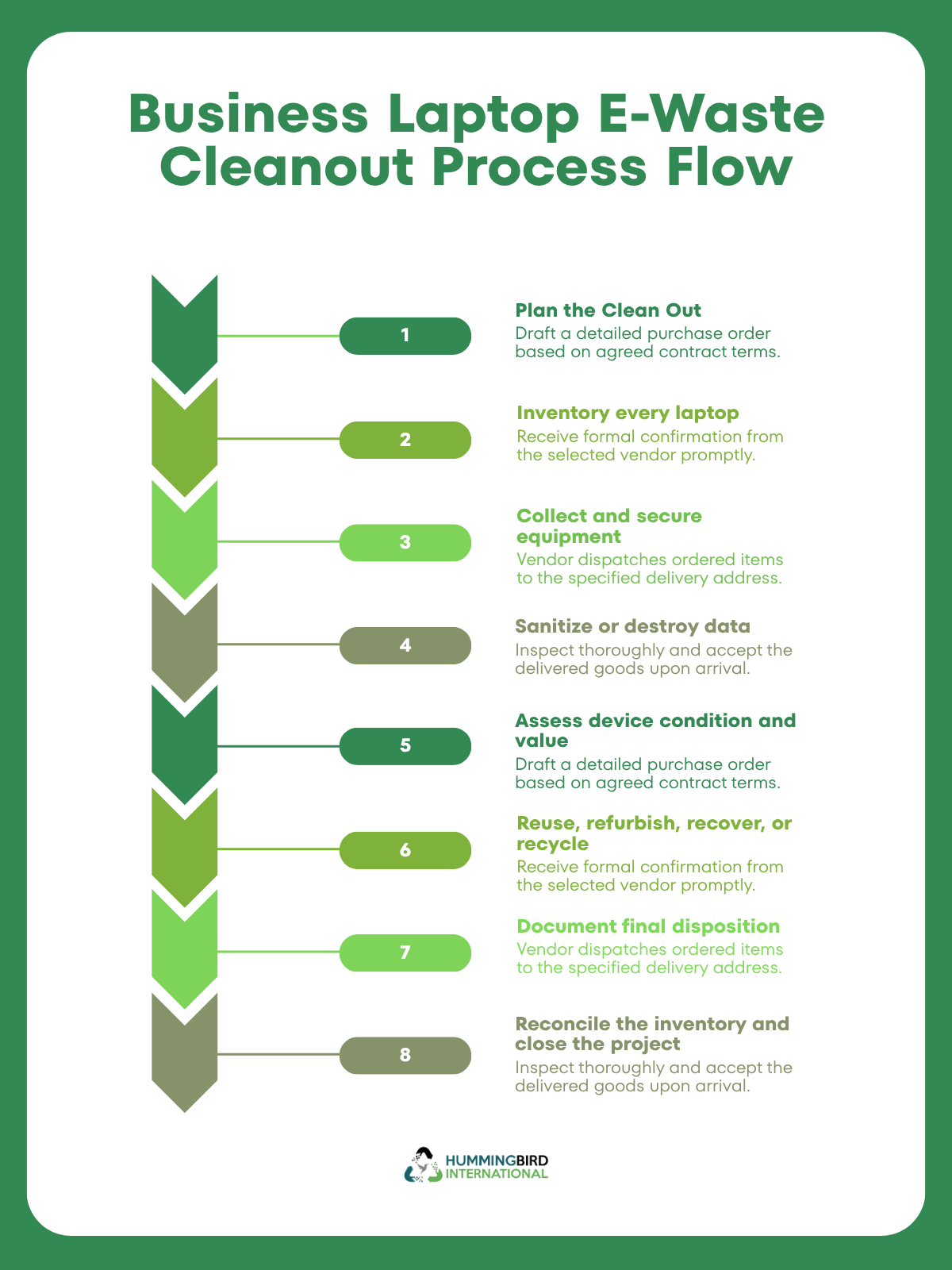
1. Plan the Business Laptop Cleanout
Before collecting a single laptop, establish what you need to accomplish. For a small office, this might mean collecting a few dozen retired laptops. If it’s a larger organization, it could involve equipment spread across multiple offices, departments, warehouses, or remote employees.
The planning stage should cover:
- Scope: How many laptops and other electronics are included?
- Locations: Where is the equipment currently stored?
- Ownership: Which department or business unit owns each asset?
- Timeline: When will collection begin and when must it be completed?
- Responsibilities: Who handles IT, employee communication, inventory, facilities, security, and logistics?
- Data requirements: What must happen to information stored on each device?
- Disposition requirements: Which equipment may be reused, refurbished, resold, or recycled?
- Documentation: What records does the company need at the end of the project?
- Logistics: How will equipment be packaged, transported, and secured?
2. Create an Inventory of Every Laptop
This is the foundation of a controlled e-waste disposal. Before the equipment is handed over for recycling or disposition, create a record of each laptop. The goal is to be able to answer ‘what happened to this specific asset?’ throughout the process.
Across a large-scale business laptop cleanup, use a spreadsheet or asset-management system.
| Inventory Field | Purpose |
| Asset ID | Connects the device to company records |
| Serial number | Identifies the individual laptop |
| Make and model | Identifies equipment type |
| Assigned user | Establishes previous custody |
| Department | Identifies business ownership |
| Location | Tracks where equipment was collected |
| Condition | Helps determine disposition |
| Accessories | Chargers, docks, etc. |
| Data status | Tracks sanitization/destruction |
| Final disposition | Reuse, resale, recycling, etc. |
| Date collected | Establishes collection timeline |
| Final status | Confirms project completion |
3. Collect and Secure the Equipment
Once the inventory is clear, start collecting the laptops according to the disposal plan. This involves:
- Employee handoffs
- Department-level collection
- Central collection points
- IT storage-room consolidation
- Pickup from multiple offices
- Secure collection from remote workers
During collection, verify the asset tag or serial number against the inventory record. Equipment should then be placed in a controlled location until it is transferred for processing. Avoid leaving collected laptops unattended in open office areas, loading docks, or unsecured storage.
The process should also factor in packaging, secure storage, pick-up scheduling , transportation and chain-of-custody.
4. Secure the Data Before Disposal
Before a device is recycled, resold, donated, or otherwise transferred, figure out how its data will be handled. Depending on the organization’s requirements and the device, this means different methods of removing confidential information. It can range from data destruction, secure erasure, cryptographic erasure to physical destruction of storage media.
This goes beyond just deleting files and is an operation that should also be recorded. Your inventory can include a field such as:
Data status: Pending, sanitized, destroyed and verified.
You also need to maintain data wipe documentation showing that the required data-security step was completed.
5. Assess Each Laptop for its Best Disposition
After collection and data handling, evaluate the business laptop’s condition and potential value.
Different aspects can influence this decision, including the device’s age, operating condition, physical damage, battery condition, processor and specifications or storage capacity. Other than this, you also need to think of market demand, repair costs, data-security requirements, and potential resale or recovery value.
A professional IT asset disposition service helps businesses evaluate each device individually rather than treating every laptop as identical.
6. Reuse, Refurbish, Recover, or Recycle
Once equipment has been assessed, assign each device a category according to its disposition stage.
Reuse
Functional equipment that still meets business requirements may be redeployed internally or transferred for another legitimate use.
Refurbishment
Some equipment may need testing, repair, cleaning, component replacement, or other processing before it can be reused or sold.
Value recovery
Equipment with remaining market or component value may be suitable for resale or other recovery channels.
Recycling
Laptops that are obsolete, damaged, uneconomical to repair, or otherwise unsuitable for reuse can enter the appropriate electronics recycling stream.
The key principle is to determine the appropriate disposition for each asset rather than automatically sending everything to recycling.
Learn more: Laptop Recycling Guide 101
7. Move Equipment through the Recycling/Disposition Stream
A typical workflow may cover every stage from receiving to recycling and documentation or destruction.
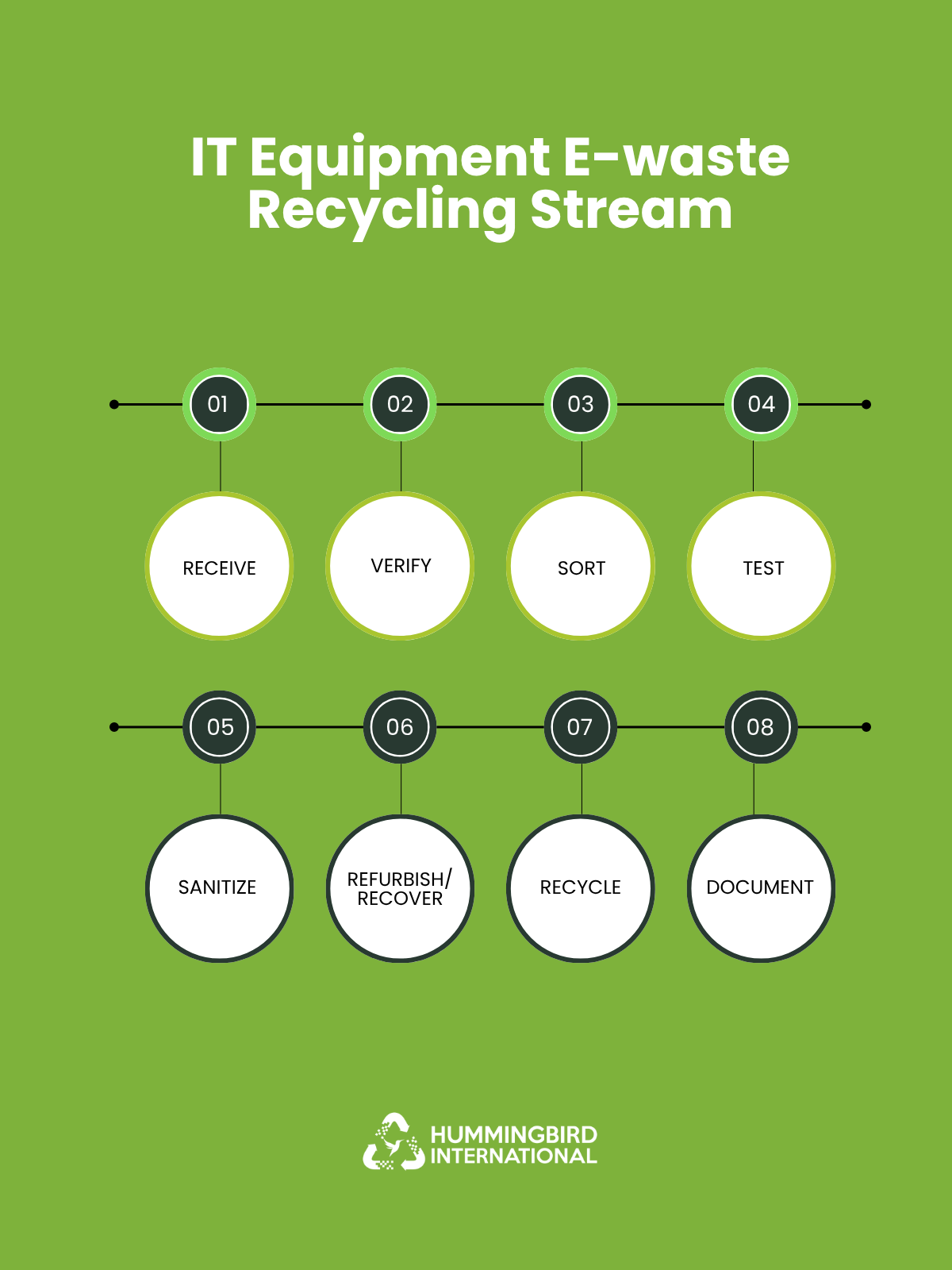
Depending on the equipment and service, processing can involve:
- Device testing
- Sorting
- Component recovery
- Refurbishment
- Parts harvesting
- Material recovery
- Responsible recycling
- Downstream processing
Some equipment may be suitable for reuse and other devices could enter material-recovery processes.
8. Document the Final Disposition Checklist
The business should check its original inventory against the equipment that was collected and processed. Depending on the service, relevant documentation may include:
- ☐ Asset disposition report
- ☐ Collection record
- ☐ Chain-of-custody documentation
- ☐ Data sanitization/destruction documentation
- ☐ Certificate of data destruction, where applicable
- ☐ Recycling certificate or report
- ☐ Weight/material report
- ☐ Resale or recovery report
- ☐ Final disposition record
The objective is to create a clear record connecting the original asset to collection, data handling, processing and final disposition. This becomes quite valuable when a company needs to demonstrate what happened to retired equipment months or years after clearing them out.
9. Close the Cleanout
This is where you compare original inventory, equipment collected, devices processed and final disposition records. Investigate if anything is missing like missing tags or unreturned laptops. Then archive the completed records according to the company’s retention practices.
By the end of a business laptop cleanout, the company should be able to confirm:
- ☐ Every laptop was identified
- ☐ Every collected asset was tracked
- ☐ Data requirements were addressed
- ☐ Equipment was assessed for disposition
- ☐ Reuse/recovery opportunities were considered
- ☐ Remaining e-waste entered an appropriate recycling process
- ☐ Required documentation was received
- ☐ Inventory was reconciled
- ☐ Exceptions were resolved
- ☐ The project has a documented closeout
Choose a Business Laptop Cleanout Service
An e-waste recycling provider is an important partner in a business laptop office pickup. For a company, a suitable service should be able to handle the equipment securely, protect sensitive business data and maintain accountability. It’s also important for them to provide documentation showing what happened to the equipment.
Look for Experience With Business IT Equipment
Businesses should first look for whether the provider regularly handles corporate IT equipment or not, instead of primarily serving individual consumers.
They need to show experience handling:
- Business laptops and desktops
- Large quantities of computers
- Monitors and peripherals
- Servers and networking equipment
- Laptop batteries and chargers
- Equipment from office relocations
- Hardware refresh projects
- Office closures and corporate cleanouts
A service that works on business projects is more likely to understand the importance of your cleanup requirements.
Look for How they Handle Data on Old Laptops
Data security should be considered separately from recycling. Old laptops may contain employee information, customer records, financial information, business documents, passwords and credentials or intellectual property.
Before handing equipment over, make sure you know what happens to storage devices and if they offer a documented data-sanitization or destruction process. Businesses should follow their own IT security requirements and use an appropriate sanitization or destruction process.
Check for Chain-of-Custody
When a company is disposing of a large number of devices, they need to show proof. A provider should be able to explain how equipment is identified and tracked throughout this process with a chain-of-custody certificate.
For example, businesses can ask:
- Who collects the equipment?
- How is the equipment counted?
- Are serial numbers or asset IDs recorded?
- Where is equipment taken after pickup?
- Who has access to it?
- How is equipment tracked during transportation?
- What happens if equipment is transferred to another facility or processor?
The goal is to minimize uncertainty about where business equipment goes after it leaves the office.
List What Documentation You Will Receive
Depending on the provider and project, businesses may want records such as:
- ☐ Equipment inventory
- ☐ Pickup or collection manifest
- ☐ Asset reconciliation report
- ☐ Data-destruction certificate
- ☐ Recycling certificate
- ☐ Certificate of recycling or destruction
- ☐ Weight reports
- ☐ Final disposition report
The exact documentation available will vary by provider and jurisdiction. So businesses should confirm requirements before collection.
Understand What Happens to the Equipment
A good provider should be able to explain the recycling downstream process. Old business laptops may be collected from the business, sorted, assessed and processed for data security.
They also need to be tested for potential reuse or refurbishment. If nothing is useful, businesses can send devices for recycling.
It’s very important when a business wants to understand the environmental outcome of its e-waste cleanout rather than simply getting equipment removed from its premises.
Verify how Batteries and Accessories are Handled
Find out how the provider handles electronic waste other than laptops. This covers anything from Lithium-ion batteries, chargers, power supplies, monitors, cables or other electronics.
This is especially relevant for large office pickups or disposals, where batteries and accessories can represent a significant amount of additional material.
Get a Plan for Collection and Logistics
For a small number of laptops, transportation may be relatively straightforward. A corporate office cleanout involving hundreds of devices requires more planning.
Look for potential providers that have a plan for:
- On-site pickup
- Quantity they can handle
- Collection from multiple office locations
- Pickup schedule in advance
- Preparation of equipment
- Loading responsibility
- Packaging and transportation of batteries
Provide the recycler with an estimated number of devices, equipment types, locations and preferred collection date when requesting a quote.
Check Applicable Certifications and Compliance
Businesses should ask providers about the certifications, licenses, registrations or other credentials that are relevant to their location and the services being offered. The exact e-waste disposal compliances change according to jurisdiction and by the type of e-waste being processed.
Consider Factors that Go Beyond Price
Price is naturally part of a business decision but the cheapest quote may not represent the same service scope as another provider. A quote should ideally be compared on total scope which should be prioritized more than price.
| Factor | Questions to Ask |
| Collection | Is pickup included? |
| Transportation | Who handles transportation? |
| Data Security | Is data sanitization/destruction included? |
| Tracking | Are assets tracked individually? |
| Recycling | Where does equipment go after collection? |
| Documentation | What certificates/reports are provided? |
| Batteries | Are batteries accepted and handled appropriately? |
| Volume | Can the provider handle the entire cleanout? |
| Multiple Locations | Can they coordinate multiple pickups? |
| Reporting | Will the business receive a final disposition report? |
Red Flags to Watch For
Businesses should be cautious when a potential provider:
- ➔ Cannot clearly explain where equipment goes after collection.
- ➔ Offers no process for handling data-bearing devices.
- ➔ Cannot explain how equipment is tracked.
- ➔ Is unwilling or unable to provide agreed documentation.
- ➔ Gives vague answers about downstream recyclers.
- ➔ Cannot explain how batteries are handled.
- ➔ Provides a quote without asking about equipment type, quantity or location.
- ➔ Makes broad environmental claims without supporting information.
These don’t automatically prove that a provider is unsuitable, but they are reasons to ask additional questions and verify the provider’s claims.
Get Started on Your Business Laptop Cleanout
A business laptop disposal is an opportunity to take control of your IT assets and reduce unnecessary electronic waste. The process becomes much easier when businesses follow a clear plan. With a structured business laptop e-waste recycling checklist and a qualified recycling provider your organization can turn an otherwise complicated office cleanout into a manageable process.
Ready to plan your office e-waste cleanout?
Hummingbird International can help businesses organize the collection and responsible recycling and disposal of obsolete laptops and other electronic equipment. Contact the team to discuss your equipment volume, locations, data-security requirements and preferred collection schedule.
Frequently Asked Questions (FAQs)
1. How should a business dispose of old laptops?
First of all, take an inventory of old laptops, check ownership and lease requirements, back up necessary information and securely sanitize or destroy data. Send the equipment to an appropriate e-waste recycling or IT asset disposition provider. Keep documentation of collection and final disposition for your records.
2. Can business laptops be recycled?
Yes. Business laptops can be recycled after they have been properly processed for data destruction. Depending on their condition, some devices may be suitable for reuse or refurbishment. And others can be dismantled to recover materials such as metals, plastics, and electronic components.
3. What should I do before recycling a business laptop?
Identify the device in your asset inventory, remove or securely sanitize business data according to your organization’s requirements. Then disconnect it from company systems, and separate or identify associated accessories and batteries. If using a recycling provider, confirm how they handle data-bearing devices and what documentation they provide.
4. What is included in an office e-waste cleanout?
It covers laptops, desktop computers, monitors, tablets, printers, servers, docking stations, chargers, power supplies, cables, keyboards and other electronic equipment.
5. How do I choose a business e-waste recycling provider?
Look for experience in handling corporate IT equipment and ask about data sanitization, asset tracking, chain-of-custody and secure transportation. Get information on battery handling, downstream processing, and recycling documentation. Compare providers based on the full scope of services.