
Decommissioning a data center needs to account for data security, asset tracking, logistics and compliance. The process also has to factor in potential recovery of value from retired hardware. A successful data center decommissioning project requires careful planning at every stage. From identifying and securing data-bearing assets to coordinating removal, transportation, resale or recycling. Each of these steps need to be managed well.
- What is Data Center Decommissioning
Data Center Asset Disposition Decision Matrix - How to Plan a Data Center Decommissioning Project
- Define the Scope of the Decommissioning
- Build a Complete Asset Log
- Identify Data Security Requirements
- Create a Shutdown and Decommissioning Schedule
- Assign Roles and Responsibilities
- Work on Physical Removal and Logistics
- Document Chain-of-Custody Procedures
- Prepare the Site Before Equipment Removal
- Secure Documentation and Reporting Requirements
- Conduct a Final Review
- Ready to Plan Your Data Center Decommissioning?
- Frequently Asked Questions(FAQs)
- 1. What happens during data center decommissioning?
- 2. How do I know if my data center is ready for decommissioning?
- 3. What happens to servers and other equipment after decommissioning?
- 4. How is sensitive data protected when equipment leaves a data center?
- 5. Can data center decommissioning recover value from old equipment?
What is Data Center Decommissioning
When a business retires a data center or a portion of its infrastructure, there needs to be removal of the equipment, systems and assets associated with it. This is data center decommissioning.
Data center decommissioning also involves IT asset disposal, e-waste management and maintaining chain of custody. Businesses must have records that demonstrate what happened to the equipment in case of an audit.
Equipment included in Data Center Decommissioning
This should cover IT equipment, data-bearing media, power infrastructure, networking equipment and supporting hardware.
- Servers — Rack, blade and tower servers, along with any other server hardware
- Storage Arrays — SAN, NAS, disk arrays and other enterprise storage systems
- HDDs and SSDs — Internal and removable hard drives and solid-state drives
- Network Switches and Routers — Core, distribution and access switches, routers and other networking equipment
- Racks and Cabinets — Server racks, network cabinets, enclosures and mounting hardware
- UPS Systems — Uninterruptible power supplies and their battery systems
- PDUs — Power distribution units and related power management equipment
- Tape Libraries and Media — Tape libraries, tape drives and cartridges
- Cables and Accessories — Power cables, fiber and copper cabling, transceivers, adapters and other connectivity accessories
- GPUs and Specialized Computing Equipment — GPUs, AI/ML hardware and high-performance computing systems
- Spare Parts — Replacement drives, memory, processors, power supplies, fans and other maintenance inventory
- Peripherals — Monitors, keyboards, mice, KVM equipment and docking stations
- Other Infrastructure — Firewalls, load balancers, appliances, monitoring equipment, security hardware and anything else found during the site inventory
Key Stages of Data Center Decommissioning
It progresses from initial planning to asset discovery through migration, shutdown, equipment removal, data sanitization and final closure. Some may also be redeployed, remarketed, physically destroyed or recycled. Those left could go for IT asset recovery.
Here are the main stages of decommissioning data centers.
Planning and site assessment
Before any equipment is touched, the project scope needs to be established. An extensive site assessment establishes what needs to be decommissioned first. This also determines how the work will be carried out and what restrictions or dependencies could affect it.
These aspects need to be considered:
- Which facility, room, racks, or equipment are included
- Number and types of assets
- Facility access requirements
- Shutdown dependencies
- Security requirements
- Loading dock and transportation requirements
- Project deadlines
- Required documentation
Poor planning can create delays, inventory issues, security risks and unexpected costs later on.
Asset inventory and identification
Every device and electronic item should be accounted for before removal. The inventory provides the information needed to track equipment throughout the process.
A comprehensive one covers:
- Asset ID
- Asset tag
- Manufacturer
- Model
- Serial number
- Equipment type
- Rack/location
- Condition
- Data-bearing status
- Intended disposition
It’s important to pay attention to the inventory as it creates the foundation against which the entire project can be measured.
| Field | What to enter |
| # | Sequential inventory number |
| Asset ID | Unique identifier assigned for the project |
| Asset Tag | Existing organizational asset tag |
| Manufacturer | Dell, HPE, Cisco, IBM, etc. |
| Model | Exact equipment model |
| Serial Number | Manufacturer serial number |
| Equipment Type | Server, storage, switch, router, UPS, drive, etc. |
| Facility / Room | Data center, building, room, or data hall |
| Rack / U-Position | Rack number and equipment position |
| Condition | Good, Fair, Damaged, End-of-Life |
| Data Bearing? | Yes / No / Unknown |
| Data Handling | Sanitization, Destruction, None, Pending |
| Planned Disposition | Redeploy, Resell, Destroy, Recycle, Pending |
| Final Disposition | Actual outcome after processing |
| Status | Inventoried, Verified, Removed, In Transit, Processed, Complete, Exception |
| Removal Date | Date equipment was removed |
| Transport Ref. | Shipment, manifest, or transportation reference |
| Certificate / Report Ref. | Destruction, recycling, or final disposition reference |
| Value Recovered | Revenue or credit generated from the asset |
| Notes | Exceptions, missing information, damage, or other relevant details |
Electronics/Device classification and disposition path
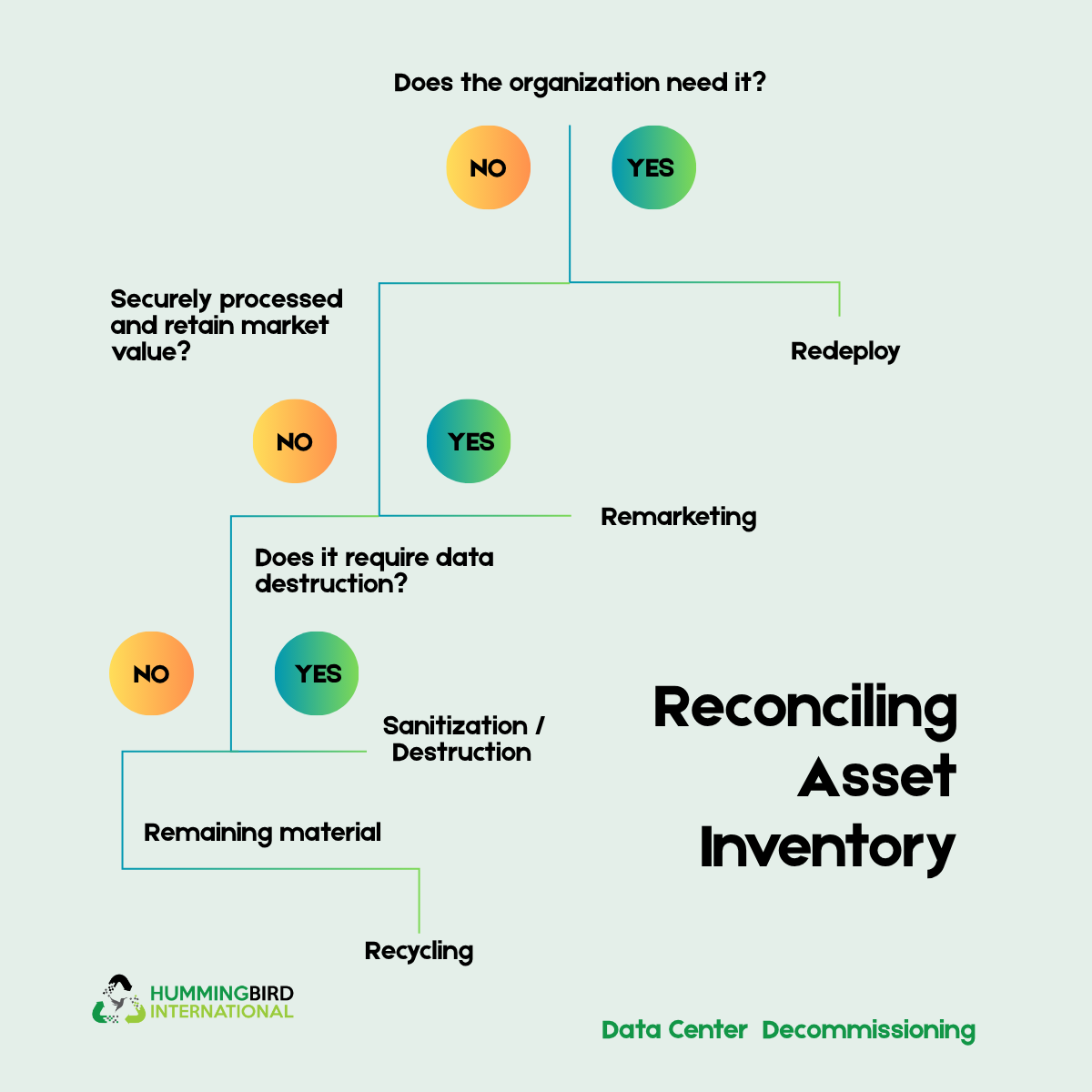
Once assets have been tracked, they need to be evaluated and assigned an appropriate disposition channel.
- –Redeployment: Equipment that can be reused internally
- –Remarketing: Functional equipment with potential resale value
- –Data sanitization: Equipment that can be securely cleared for reuse or resale
- –Physical destruction: Assets or media requiring destruction
- –Recycling: Equipment that has reached the end of its useful or economic life
Consider equipment condition, age, market value, data sensitivity, organizational requirements and the cost of processing.
Learn more: Data Destruction and Device Disposal
Data Center Asset Disposition Decision Matrix
| Question | Redeploy | Resell | Sanitize & Resell | Destroy | Recycle |
| Is the equipment still operational? | Yes | Yes | Yes | Not necessarily | No / limited |
| Does the organization need it elsewhere? | Yes | No | No | No | No |
| Does it have resale value? | Not applicable | Yes | Yes | Usually no | Usually low |
| Does it contain data? | Yes/Maybe | No or sanitized | Yes | Yes | Yes/Maybe |
| Can the data be securely removed while preserving the asset? | Yes | N/A | Yes | No / not preferred | Depends |
| Is physical destruction required? | No | No | No | Yes | Sometimes for media |
| Is the equipment suitable for reuse? | Yes | Yes | Yes | No | No |
| Recommended outcome | Keep and reuse internally | Sell through appropriate channels | Secure data, then remarket | Physically destroy and document | Process through appropriate recycling |
| Typical documentation | Asset transfer record | Disposition / sales record | Sanitization + disposition record | Certificate of destruction | Recycling certificate / disposition record |
Data protection and migration
Identify what must be retained by classifying workloads and data into appropriate categories to simplify the process.
- A. Migrate — applications and data moving to a new data center, cloud or another facility
- B. Archive — data that must be retained but is no longer actively used
- C. Retire — obsolete applications or data with no retention requirement
- D. Replace — applications being moved to a new platform or SaaS service
Migration process
This should be performed before decommissioning the source infrastructure. For each workload, make sure that you define the source and target environment. Highlight the migration method, data volume as well as expected downtime.
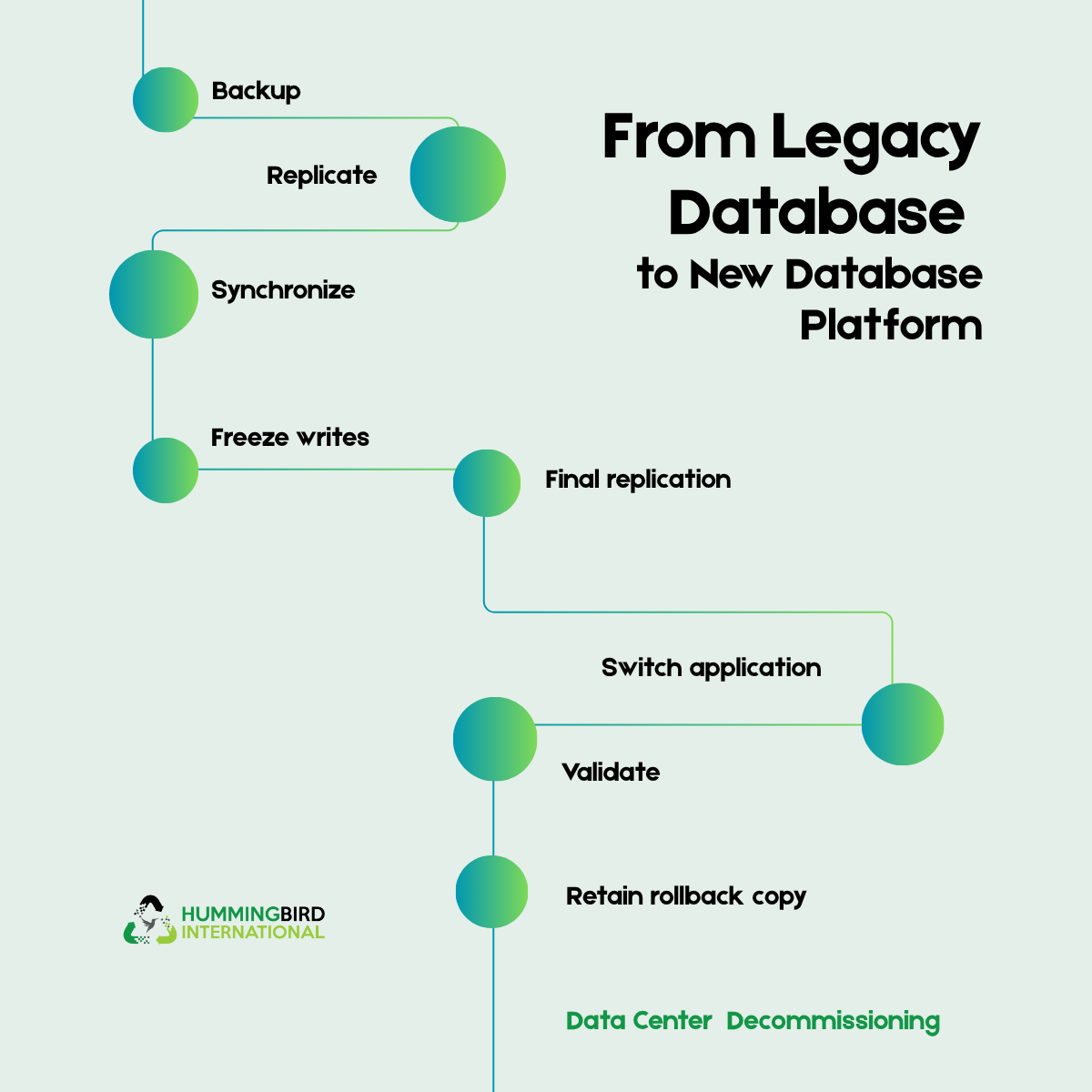
Backups and recovery
Before shutdown verify that backups have been completed successfully. Test restoration of representative data and make sure backup copies are accessible outside of the data center being decommissioned. Lastly, document where archived data will reside and who can access it.
Data Sanitization
Turning a server off does not remove the data from it. You have to be certain that sensitive information cannot be recovered by whoever subsequently receives the equipment or media.
Identify every data-bearing medium
Consider HDDs, SSDs/NVMe, SAN/NAS disks, backup tapes, USB devices, memory cards, appliance storage and decommissioned laptops/workstations.
Determine the required sanitization method
The appropriate method depends on the media, data sensitivity, and organizational policy.
Typical approaches include:
| Clear | Purge | Destroy |
| Makes data inaccessible through normal system interfaces. Generally appropriate only for lower-risk situations. | Uses techniques intended to make recovery substantially infeasible, such as appropriate cryptographic or device-specific sanitization mechanisms. | Physically destroy the media so that data cannot reasonably be recovered or consider hard drive disposal. For highly sensitive media that cannot be reliably sanitized, physical destruction may be required by policy. |
Consider cryptographic erasure
If storage was encrypted, destroying the relevant encryption keys can make the encrypted data effectively inaccessible. Identify the encryption technology and confirm there are no usable copies elsewhere. You also have to consider documenting the key-destruction event.
Maintain evidence
For every sanitized/destroyed asset, retain the records which are relevant such as:
- Asset ID
- Serial number
- Media type
- Sanitization method
- Date/time
- Person/vendor responsible
- Verification result
- Certificate of destruction, where applicable
Process Flow
Asset → Data → Sanitization → Verification → Disposition
Asset disposal and shutdown
Once data has been appropriately sanitized, the physical assets can be removed. And then businesses can proceed with a shutdown
Reconcile the asset inventory
Before physically removing anything, compare against inventory. Identify discrepancies such as missing equipment, incorrect serial numbers and spare equipment. This reconciliation is very important for storage devices.
De-racking
Physical removal should follow a controlled procedure. Confirm equipment is approved for removal. Label equipment according to its disposition and remove power or network connections. Package the devices, finalize by updating the assets.
Cable management
Remove power cables, copper network cables, fiber, management connection and storage fabric connections. For reusable setups, preserve cables that have value. If there’s abandoned cabling, follow the facility’s requirements for removal and recycling.
Secure transportation
After removal, equipment can still contain sensitive information. Use controlled transportation with:
- – Chain-of-custody documentation
- – Authorized personnel
- – Secure staging areas
- – Tamper-evident packaging where appropriate
- – Approved disposal/recycling vendors
Proceed with the shutdown, safely powering down and removing all decommissioned equipment.
Learn more: IT Asset Recovery Explained
Data Center Decommissioning vs. ITAD
Decommissioning focuses on safely shutting down and removing data center infrastructure. And ITAD focuses on what happens to IT assets after they leave service. Both are complementary instead of competing services.
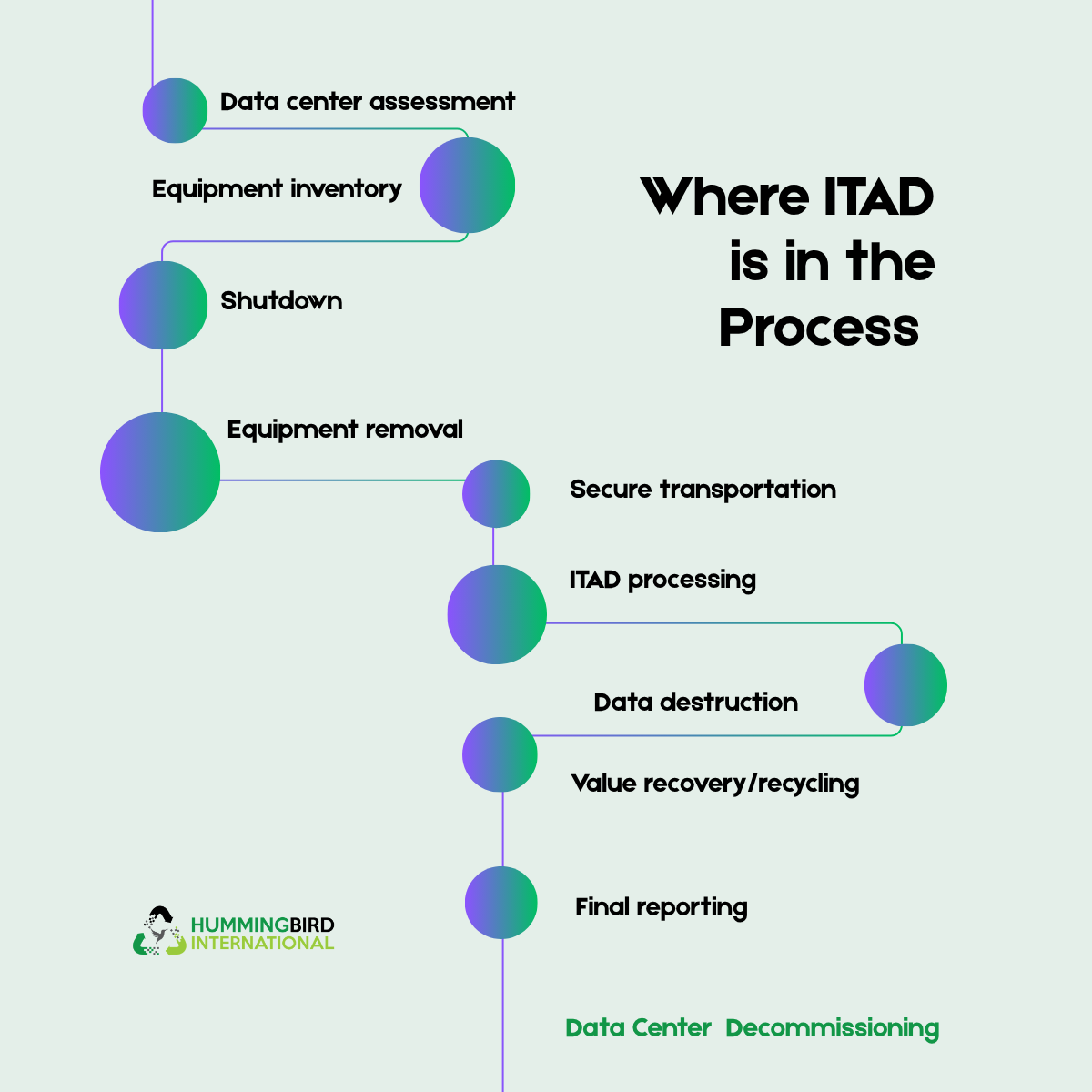
For example, when an organization closes a data center, the decommissioning process handles the shutdown and physical removal. Once that is done, ITAD can manage the secure disposition of the equipment or data.
For adding table
| Aspect | ITAD | DCD |
| Full form | IT Asset Disposition | Data Center Decommissioning |
| Main purpose | Securely manage and dispose of retired IT assets | Dismantle and remove infrastructure from a data center |
| Primary focus | Data security, asset recovery, reuse and recycling | Physical/logistical removal of data-center infrastructure |
| Typical activities | Data wiping/destruction, resale, refurbishment, recycling, asset tracking | De-racking servers, removing cabling, dismantling equipment, packing and transportation |
| Data security | Secure wiping or physical destruction | Usually ensures equipment is handled securely, but data destruction may be handed to an ITAD provider |
| Asset resale | Recover residual value | Not normally the primary objective |
| Physical dismantling | Usually limited | Core activity |
| Inventory | Tracks individual assets through disposition | Inventories racks, servers, networking equipment and infrastructure before removal |
| End result | Assets are reused, resold, recycled or securely destroyed | Data-center space/infrastructure is cleared and equipment moved to its next destination |
| Typical provider expertise | Asset management, data destruction, recycling and remarketing | Data-center engineering, logistics, de-racking and infrastructure removal |
| Relationship | Can be the next stage after DDC | Can feed equipment into an ITAD process |
Learn more: How to find an ITAD Partner
A single data center decommissioning project may include ITAD, data destruction, remarketing, recycling, logistics, and reporting as different components of the same project.
| Situation | Recommended Approach |
| Closing or dismantling a data center | Full data center decommissioning project |
| Retiring servers or storage without closing the facility | IT Asset Disposition (ITAD) service may be sufficient |
| Closing a facility and disposing of its equipment | Both data center decommissioning and ITAD may be required |
| Primarily concerned with sensitive data on retired equipment | Focus on ITAD and verified data destruction |
| Looking to recover value from retired equipment | ITAD can evaluate assets for reuse, resale, refurbishment, or recycling |
What Happens After Your Data Center Shuts Down?
Once the equipment is powered off, businesses still need to determine what happens to the hardware. And this is where data security and backup also comes in.
Value Assessment
Servers, storage systems, networking equipment, racks have to be assigned a clear next step based on condition, value and requirements.
Off-Location Data Restoration
Anything confidential stored on retired equipment needs to have multiple backups. These can help with restoration later on and prevent it from complete erasure.
E-waste Management
With a documented process, it’s a lot easier to find out where your e-waste goes. This creates accountability from removal to decommissioning.
Equipment Reuse
If equipment is not obsolete, it can be set up at another location. This saves additional costs and is an eco-friendly practice as well.
Compliance Assurance
A complete decommissioning helps businesses meet applicable data security, environmental and IT asset management requirements.
Closed Lifecycles
There needs to be a responsible closing of the lifecycle of infrastructure. And you can easily check that all loops are closed against records.
When to Opt for Data Center Decommissioning
This may be the right choice when your organization is closing, consolidating, relocating or majorly changing its IT infrastructure. Common factors include:
- –Data Center Consolidation: You are combining multiple facilities or reducing your physical data center footprint
- –Cloud Migration: Workloads are moving to cloud infrastructure, leaving on-premises servers and equipment ready for retirement
- –Facility Closure: A data center or facility is being permanently shut down and its infrastructure needs to be removed
- –Lease Expiration: If any facility lease is ending and equipment must be removed, transferred or dispositioned before handover
- –Hardware Refresh: Older servers, storage, networking equipment or other infrastructure are being replaced as part of a technology refresh
- –Data Center Relocation: IT infrastructure is moving to a new facility, requiring the existing site to be dismantled or cleared
- –Mergers and Acquisitions: Two organizations or IT environments are being integrated, creating redundant infrastructure
- –Capacity Changes: Changes in business or computing requirements make part or all of an existing data center unnecessary
- –Aging Infrastructure: Legacy equipment, power systems, cooling infrastructure, or other components have reached the end of their useful life.
How to Plan a Data Center Decommissioning Project
The planning process should establish what is being decommissioned, when and how it will happen, who is responsible, and where every asset will go afterward. A successful data center decommissioning starts long before servers are powered down or equipment reaches the loading dock. If your workflow is strategic, it helps prevent data exposure, unexpected costs, operational disruption and problems with asset tracking.
Define the Scope of the Decommissioning
Start by establishing exactly what the project includes. Make it clear if you are decommissioning an entire facility, a specific data hall, individual racks or selected infrastructure.
Document the equipment and systems that will be removed, including:
- Servers and storage systems
- Network and telecommunications equipment
- Racks and cabinets
- UPS systems and batteries
- Power distribution equipment
- Cooling and environmental equipment
- Cabling and connectivity infrastructure
- Security and monitoring equipment
The scope should also identify any equipment that will remain operational. It is important when decommissioning only part of a facility, where removing or disconnecting one system could affect equipment that still needs to operate.
Build a Complete Asset Log
Before anything is disconnected, create a list of the equipment inside the data center. Record all the details such as manufacturer and model, serial number, equipment type, condition and disposition.
Compare the physical inventory with existing asset-management records. This is how you build a reliable inventory as you move ahead with decommissioning.
Identify Data Security Requirements
Collect all devices and components that may contain sensitive or confidential information. These can include servers, network devices, backup systems and removable media.
For each data-bearing asset, make sure you secure or sanitize confidential information beforehand. A documented chain of custody should track assets from removal through transportation and final disposition.
Create a Shutdown and Decommissioning Schedule
The physical removal of equipment should only begin after the operational shutdown plan has been established. Work with IT, infrastructure, application, and facilities teams to determine:
- – Which systems need to be migrated or backed up
- – Which applications depend on the equipment
- – When systems can safely be powered down
- – The sequence in which equipment should be disconnected
- – When electrical and cooling systems can be shut down
- – When equipment can be released for removal
Create a schedule around business requirements rather than simply choosing a removal date. If critical systems are still dependent on the facility, premature shutdown can cause unnecessary service interruptions.
Assign Roles and Responsibilities
Data center decommissioning involves multiple teams and external providers. Assign clear ownership for each part of the project.
- Data security teams
- Facilities management
- Asset management
- Procurement
- Compliance and legal teams
- Security personnel
- Logistics providers
- ITAD or decommissioning experts
Clarify who approves shutdowns, authorizes asset removal, verifies inventory, manages data destruction and receives the final documentation.
Work on Physical Removal and Logistics
Before the decommissioning begins, there are certain aspects to consider. Loading dock availability, building access requirements, dimensions and weight limits, door and corridor dimensions as well as vehicle access. You also need to coordinate pickup schedules to avoid issues.
Large servers, storage systems, UPS equipment, and batteries may require specialized handling.
Document Chain-of-Custody Procedures
You need to have a documented workflow for tracking assets from the moment they are removed.
Data center → Removal team → Secure staging → Transportation → Processing facility → Final disposition
At each stage, records should identify what was transferred, the date and the person or team responsible for it. Proper documentation provides visibility throughout the process and supports audit or compliance requirements.
Prepare the Site Before Equipment Removal
The data center itself needs to be prepared for the removal operation. Complete tasks such as:
- Clearing access routes
- Preparing staging areas
- Removing unnecessary obstacles
- Coordinating building security
- Protecting floors and walls where necessary
- Confirming power isolation procedures
- Preparing appropriate handling equipment
For larger centers, look for a dedicated staging area where equipment can be inventoried, secured and prepared for transportation.
Learn more: How to Decommission a Hyperscale Data Center
Secure Documentation and Reporting Requirements
Decide what documentation you need before the project starts instead of trying to figure out records later.
Depending on the project, documentation may include:
- – Final asset inventory
- – Chain-of-custody records
- – Data destruction certificates
- – Recycling certificates
- – Asset disposition reports
- – Resale/value recovery reports
- – Transportation records
- – Final summary
These can help organizations show that their assets and data were handled according to internal requirements.
Conduct a Final Review
Once all equipment has been removed, compare the final physical condition of the facility against the original scope. Confirm that all planned equipment has been removed and remaining systems are still operational where applicable.
Check that data-bearing assets have been accounted for. This way you can make sure that data destruction has been completed or asset disposal has taken place. A final review allows you to get the facility ready for its next use, closure, or handover.
Quick Planning Checklist
- Define project scope
- Complete physical asset inventory
- Identify data-bearing equipment
- Establish data destruction requirements
- Create shutdown schedule
- Assign project responsibilities
- Determine asset disposition
- Plan removal and transportation
- Prepare loading dock and staging area
- Establish chain-of-custody procedures
- Define required certificates and reports
- Schedule final reconciliation
Ready to Plan Your Data Center Decommissioning?
It requires careful planning, secure data handling, detailed asset tracking, coordinated logistics, responsible disposition and clear documentation from start to finish. You could be consolidating facilities, moving to the cloud, closing a site, refreshing hardware, or restructuring your infrastructure. A structured decommissioning process helps simplify this across every stage.
Take the next step!
Hummingbird International supports organizations through the decommissioning lifecycle, helping manage equipment removal, asset tracking, data destruction, value recovery and recycling. Contact us to discuss your equipment, timeline and project requirements.
Frequently Asked Questions(FAQs)
1. What happens during data center decommissioning?
The process includes asset inventory, system shutdown, equipment removal, data destruction, secure transportation, asset recovery or recycling and final reporting.
2. How do I know if my data center is ready for decommissioning?
When infrastructure is no longer required because of cloud migration, consolidation, relocation, facility closure or hardware refresh, it needs to be decommissioned. A site assessment can help determine the appropriate approach.
3. What happens to servers and other equipment after decommissioning?
Each asset is evaluated based on its condition, data security requirements, and remaining value. Equipment may be reused, refurbished, resold, recycled, or destroyed, instead of automatically being treated as e-waste.
4. How is sensitive data protected when equipment leaves a data center?
Data-bearing assets should be identified before removal and processed using an appropriate data sanitization or physical destruction method. Chain-of-custody controls can help track equipment from collection through final disposition with documentation provided where required.
5. Can data center decommissioning recover value from old equipment?
Yes, some servers, storage systems, networking equipment, GPUs, and components may retain resale or reuse value. The process can evaluate eligible assets for value recovery before recycling or destruction.


Leave a Reply