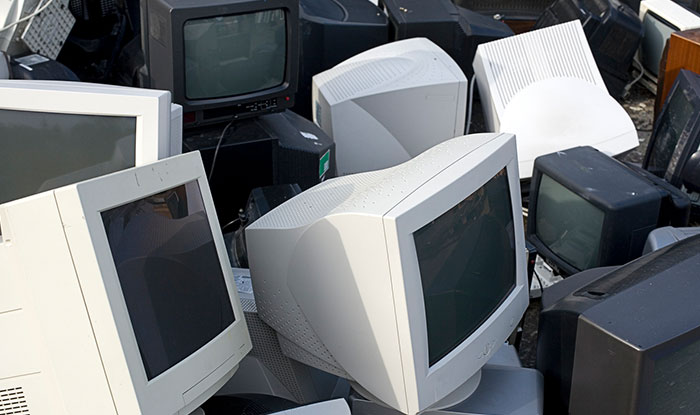
Monitors are one of the most commonly replaced tech items in homes and offices. We usually upgrade them whenever they get fuzzy, cracked, or simply outdated. But in the process of upgrading our monitors, we end up ignoring our old screens and either leave them lying around or just toss them out with regular trash.
But monitors are not something you can casually throw away. They contain materials that require careful handling and can have a significant impact on the environment if they end up in a landfill. However, the good news is that recycling them is easy, safe, and accessible for all.
To recycle your monitor, you need to prepare it properly so that it is ready. In this article, we will learn all there is to know about monitor recycling and your role in it.
Why Should You Recycle Your Monitor?
Most of us don’t think twice about old monitors once they stop working. They’re big and bulky and usually pushed to the side to ‘figure it out later’. But properly recycling your monitor is far more important.
Even the newest screens contain materials that can harm the environment if they’re tossed out with regular waste. The chemicals inside them can leak into the soil and water, affecting nearby communities and wildlife. By recycling, you’re preventing those toxins from entering the environment and keeping your surroundings safer.
And with updated e-waste laws across several U.S. states, responsible disposal has become a legal requirement, not just a nice-to-have.
What Is Inside Your Monitor?
Monitors look sleek on the outside, but inside, they contain a mix of materials that require careful handling. Some of these components are recyclable, while others can be harmful if not properly managed. Here is what you will find in your monitors:
| Component | What It Does / Why It Matters |
| Plastics | Used for the outer frame and internal parts. They take centuries to break down and release microplastics if not recycled responsibly. |
| Glass | Found in LCD and LED screens, often layered with coatings that require careful removal. |
| Metals | Includes copper, aluminum, gold, and other valuable metals used in wiring and circuit boards. These can be recovered and reused. |
| Flame Retardants | Added to prevent overheating, but can harm the environment if burned or dumped. |
| Mercury | Found in the backlights of older LCD models. Highly toxic and must be handled by certified professionals. |
| Lead | Common in older screens and extremely dangerous if it leaks into soil or water. |
Types Of Monitors You MUST Recycle
Not all monitors are built the same, and some need to be handled more carefully. But how would you know what type of monitor needs what extent of care? Here are all the types of monitors you must recycle:
CRT Monitors
Old-school bulky monitors are the most hazardous. They contain large amounts of lead and heavy glass that can contaminate soil and water if they break. Because of their toxic load, CRTs require specialized recycling facilities equipped to manage them safely.
LCD Monitors
Even though LCD screens are thinner and lighter, they still carry a risk. The older models contain mercury in their backlights, which can be dangerous if the screen cracks. Even modern LCDs include plastics, metals, and coatings that need proper dismantling.
Touch Screen Monitors
These have extra layers of sensors, adhesives, and circuit boards that require careful breakdown. And since they are more complex, recycling them ensures that each later is separated properly and reused if possible.
Where To Recycle Your Monitor
Recycling your monitor is a lot easier than you might think; you just need to know where to take it. In 2025, there will be so many more options for responsible disposal.
Certified E-Waste Recyclers
A certified e-waste recycler will give you a lot of peace of mind. Look for recyclers with proper certifications like R2v3 or e-Stewards like Hummingbird International. Companies like these follow strict safety and environmental standards that make sure all toxic materials are handled correctly and the valuable items are salvaged.
Manufacturers
Many monitor and electronics brands now offer recycling programs. Big names like Dell, HP, and Samsung let you trade in or return old screens for free or even a small credit. Some retailers also offer recycling programs so you can avoid throwing gadgets away.
Local Collection Events
Municipalities and cities often organize e-waste collection drives. The best part about these drives is that they are free, convenient, and ensure that your monitor goes to a certified recycling facility.
Free Pickup Services
Recycling companies now meet people halfway by offering free e-waste pickup. You can easily schedule a pickup, and trained staff will come over to safely collect and transport your monitor for processing.
How To Prepare Your Monitor For Recycling
With a little preparation, you can go a long way. Preparing your laptop is the first step in recycling it the right way.
Check For Repairs
Before you rush to recycle, see if your monitor can be repaired. If it’s under warranty, the manufacturer might fix or replace it. Even if it’s out of warranty, some minor fixes or even screen protectors can extend its life. And if the damages are beyond repair, then recycling is the right move.
Try Reselling
If your monitor is working, it still has value. You can sell them online or trade them in at stores to get store credit. If you find the right buyer, even broken monitors might bring value.
Disconnect To Clean
Unplug all cables and accessories so you can clean the device. Wipe the monitor with a dry cloth to remove all the dirt and dust.
Secure Broken Screens
If your screen is cracked or fragile, it is best to bubble wrap it so it stays intact through transit, and the recycler knows if your monitor is damaged and handles it accordingly.
Backup And Remove Data
Most monitors do not hold personal data, but some may have built-in smart features and storage, so it is always a good habit to check and reset before you send it in for recycling.
Conclusion
Recycling your monitor is like giving it a second chance, and it is not just about following rules or trying to avoid fines. Recycling monitors are about being part of a small but impactful movement that protects the planet, conserves resources, and develops good habits.
FAQs
Can I just throw my old monitor in the trash?
No. Monitors contain chemicals and metals that can harm the environment. Always recycle through a certified recycler, manufacturer program, or local collection drive.
Are LED monitors completely safe to throw away?
LEDs are safer than CRTs or older LCDs, but they still contain metals and plastics that should be processed properly. Never toss them in regular trash.
Can I recycle all of my monitors in the same way?
No, all monitors need to be recycled in specific ways. For instance, CRT monitors have high amounts of lead and heavy glass, which requires specialized recycling.
Do I need to remove data from my monitor before recycling?
Most monitors do not store any personal data. However, if you have a smart or all-in-one monitor, then you must reset the device and remove all data.
Where can I take my monitor for recycling?
You can take your monitors to certified e-waste recyclers, manufacturer take-back programs, and free pick up services to recycle them.


Leave a Reply