
Refreshing a business laptop fleet can be a long process, especially when you’re retiring hundreds of devices at once. Businesses need to account for IT asset tracking, data security, collection logistics, responsible recycling and final disposition. Information has to be protected and every retired laptop responsibly handled.
A comprehensive process allows businesses to make sure that every device is properly accounted for, data is securely removed and equipment is handled according to its condition. From inventory and device preparation to data destruction, secure collection, recycling and IT asset disposition (ITAD).
Why Should Businesses Retire their Laptop Fleet?
As devices age, they become slower and less reliable. It can be more expensive to maintain the fleet that may not be giving smooth results as before. Continuing to use outdated hardware can create productivity and cybersecurity challenges for employees as well as IT teams.
When you go for a laptop fleet refresh or business laptop e-waste recycling, it allows you to replace old equipment before it becomes a bigger operational problem. Here are a few factors to consider:
- Improved working conditions: Newer laptops provide better performance and support heavy applications
- Higher security: Older devices may no longer receive the hardware or software support needed to meet security requirements
- Reduced maintenance costs: Retiring unreliable devices means less investment in troubleshooting and support expenses
- Recovered value: Suitable laptops can be refurbished, reused or resold
- E-waste management: Devices that have reached the end of their useful life can be directed to the right recycling and ITAD channels
- Simplified IT support: Replacing an old fleet can cut short the time spent on supporting multiple generations of hardware.
Keep in mind that upgrading to newer devices is just the beginning. Businesses also need a clear process for securely retiring the old devices.
Learn More: A Complete Guide on Business Laptop Office Cleanout & E-Waste Recycling
Laptop Fleet Refresh Disposal Checklist
Retiring a business laptop fleet is easiest when the process is broken into clear stages. You could be handling 50 laptops from one office or 500+ devices across multiple locations. This checklist will keep your assets tracked, data protected and final disposal documented.
1. Inventory Every Laptop Before Retirement
The first step is to establish exactly what is being retired. It will also help guide you in finding a certified ITAD partner to take care of the whole process. An accurate inventory prevents devices from being lost, overlooked, or incorrectly disposed of. Record each laptop’s asset information before it leaves its assigned user or location.
This way you get the asset tag, serial number, make and model, assigned user, location, condition and ownership status.
Identify any missing or unreturned devices as well as equipment requiring special handling. Check the completed inventory against your IT asset report to make sure every device is accounted for before retirement.
| Information to Record | Why It Matters |
| Asset tag | Links the device to your internal records |
| Serial number | Provides unique device identification |
| Make and model | Helps determine reuse or recycling value |
| Assigned user | Confirms who should return the device |
| Location | Helps organize collection logistics |
| Physical condition | Supports reuse, resale, or recycling decisions |
| Ownership/lease status | Determines what can legally happen to the device |
| Accessories | Tracks chargers, docks, and peripherals |
| Final disposition | Creates a complete audit trail |
2. Plan the Fleet Retirement Timeline
Large-scale laptop retirement should be treated as a project. Mark down key dates for employee returns, data migration, sanitization, collection and final processing. For fleets spread across multiple offices, coordinate collection schedules in advance to avoid devices sitting unsecured for extended periods.
Here are a few steps that you need to keep in mind:
- Set the fleet retirement date
- Establish employee return deadlines
- Schedule replacement-device deployment
- Send for data sanitization
- Coordinate collection dates
- Confirm ITAD/recycling capacity
- Set a final reconciliation date
3. Prepare Laptops for Retirement
This involves recovering devices, migrating required information, removing business dependencies and documenting their condition.
Before wiping anything, confirm that employees have transferred business-critical files. It is important to verify that required information has been backed up or migrated to approved systems.
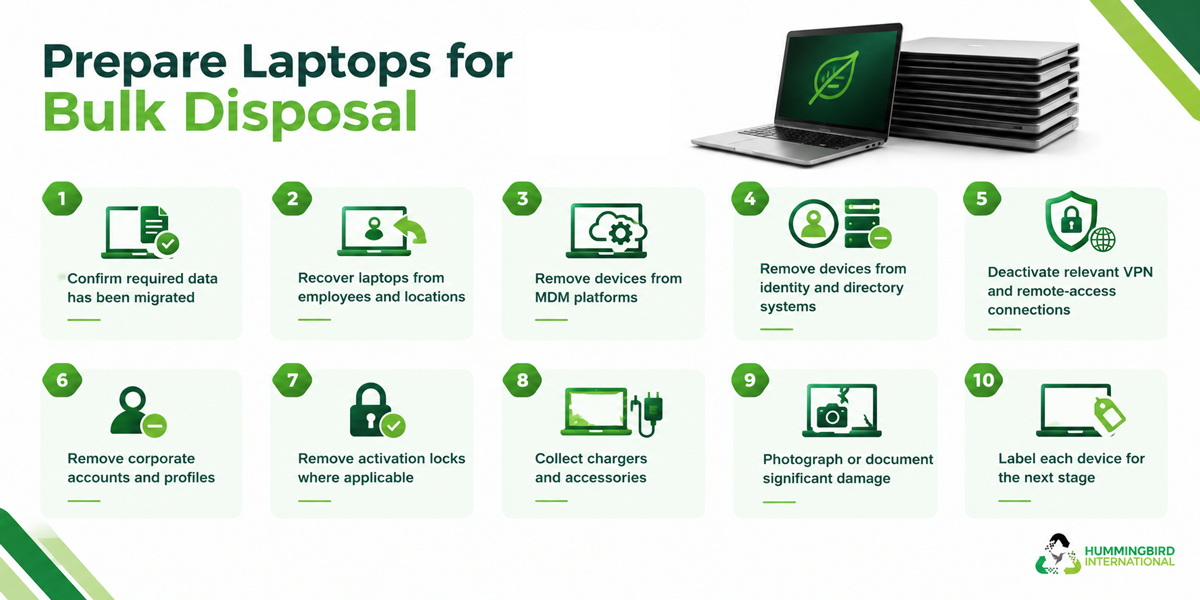
Retired devices should also be removed from relevant business platforms. These include mobile device management, endpoint security, identity management, VPN and software licensing systems.
What should happen before a laptop is wiped?
4. Securely Destroy or Erase Business Data
Data destruction is one of the most important parts of the laptop retirement process. A laptop can still contain sensitive information even after a user deletes files or performs a basic factory reset.
The right data destruction and sanitization method depends on the device, storage technology, security requirements and final disposal. For business fleets, maintain a record showing which device was sanitized and when it was.
Common data sanitization methods
| Method | Best Used For | Key Consideration |
| Secure data erasure | Devices being reused or resold | Verify that the process completed successfully |
| Cryptographic erasure | Compatible encrypted storage | Relies on effective encryption and key management |
| Physical destruction | Failed drives or devices requiring destruction | Prevents future reuse of the storage media |
| Factory reset | Limited consumer scenarios | Should not automatically be treated as secure business data destruction |
5. Sort Devices by Final Disposition Method
If you are considering IT equipment recycling, do keep in mind that this is not the only channel for retiring old devices. Some may still have useful working life and can generate value for the organization.
After data sanitization, assess each laptop and determine the most appropriate destination.
| Condition | Potential Disposition |
| Good working condition | Reuse or redeployment |
| Good condition but no internal need | Refurbishment or resale |
| Older but functional | Donation or secondary-market reuse |
| Damaged but repairable | Refurbishment |
| Beyond economical repair | Recycling |
| Failed storage or security requirements | Appropriate destruction/recycling |
This step can help businesses maximize the value recovered from their retired equipment and also reduce electronic waste.
6. Arrange Secure Laptop Pick up
Once devices are prepared and categorized, organize their physical collection. You can work with a professional e-waste pick up service provider for this as well. Making sure that laptops are gathered securely is very important when employees work across multiple offices, branches, or remote locations.
For large fleet refreshes, avoid treating collection as an informal handover. Use serialized records and documented transfers so that every device can be tracked from the business to its final destination.
| Collection Method | Suitable For |
| On-site pickup | Large centralized fleets |
| Multi-site collection | Organizations with several offices |
| Employee return program | Distributed or remote workforces |
| Scheduled vendor collection | Large-scale ITAD projects |
| Secure storage and consolidated pickup | Gradual fleet refreshes |
7. Choose an ITAD or Recycling Provider
For larger fleet refreshes, businesses may work with an IT asset disposition (ITAD) provider instead of handling every stage internally. The right one should be able to explain what happens to equipment from collection through final disposition.
Don’t evaluate providers according to pricing. Pay attention to what they have to say about data security, environmental practices, reporting and downstream processing.
Questions to ask an ITAD provider
- How is equipment transported and secured?
- How is business data destroyed?
- Can you provide certificates of data destruction?
- How are assets tracked throughout the process?
- What happens to reusable equipment?
- Where is non-reusable equipment recycled?
- Do you use downstream processors?
- What environmental certifications or controls do you maintain?
- What reports will the customer receive?
- Can you provide a complete asset-level disposition report?
Once you have listed down a few choices, proceed to a thorough evaluation. You need to look at all aspects for evaluation, like documentation and certifications. The NIST SP-800 certification for instance is a proof that auditors can require later on.
| Evaluation Area | What to Look For |
| Data security | Documented sanitization and destruction procedures |
| Asset tracking | Serialized tracking and reporting |
| Chain of custody | Documented transfers |
| Reuse | Refurbishment and resale capabilities |
| Recycling | Responsible downstream processing |
| Reporting | Asset-level final disposition records |
| Certifications | Relevant industry/environmental credentials |
| Logistics | Secure pickup and transportation |
8. Recycle or Reuse Equipment Responsibly
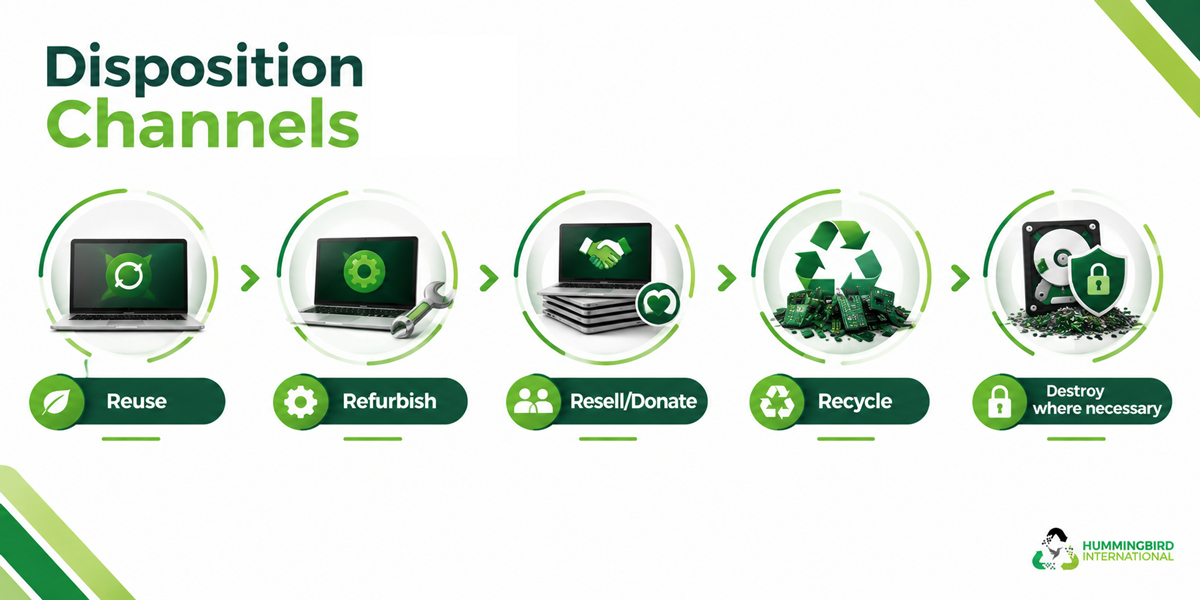
Extending the useful life of functioning equipment can reduce waste and potentially recover more value from IT equipment. Devices that are no longer suitable for business use may still have a secondary-market life. Equipment that cannot reasonably be reused should be directed to appropriate electronics recycling channels.
This approach can help businesses reduce unnecessary waste and also make better use of the residual value in retired equipment. The objective is to match each device with the most suitable outcome. This is a much better option than just letting the entire laptop fleet go to waste.
9. Documents for Final Disposition
The process isn’t complete when the laptops leave your building. You should be able to match the original inventory with the final outcome of every device.
For each laptop, record if it was reused, refurbished, resold, donated, recycled or destroyed.
| Document Type | What It Records |
| Certificate of Destruction (COD) | Confirms that equipment or data-bearing media was securely destroyed according to specified standards. |
| Certificate of Recycling (COR) | Documents that assets were processed through an approved recycling process. |
| Certificate of Data Erasure | Confirms that data was securely erased from devices and rendered unrecoverable. |
| Asset Disposition Report | Provides a detailed record of each asset and its final disposition, such as reuse, resale, recycling, or destruction. |
| Remarketing/Resale Report | Records assets that were refurbished, resold, or otherwise remarketed, including quantities and proceeds where applicable. |
| Weight/Commodity Recycling Report | Documents materials recovered through recycling, often by weight and material type. |
| Environmental Recycling Certificate | Confirms that assets were recycled or processed in accordance with applicable environmental requirements. |
| Data Destruction Log | Provides device-level details of data destruction, including method, date, and asset identifier. |
| Final Disposition Report | Summarizes the ultimate outcome of assets and provides an auditable record of the disposition process. |
10. Conduct a Post-Disposal Review
After the fleet has been retired, review to identify missing assets, process gaps, unexpected costs and opportunities for improvement. This is particularly important for organizations that regularly refresh hundreds or thousands of devices.
A post-disposal review turns one fleet refresh into a repeatable process that becomes easier, faster and more controlled each time.
Looking to Retire your Laptop Fleet?
There is a lot to keep track of when you are planning to upgrade or cut down on your laptop fleet. Businesses have to pay attention to various aspects, mostly, e-waste collection and data destruction. It is important to have equipment categorized for further disposition or reuse and then collected securely. So a checklist is the foundation to get started and streamline the process.
If your business is preparing to retire 50, 100, 500 or more laptops, Hummingbird International can help with secure collection, responsible recycling, and professional IT asset disposition solutions. Contact our team to discuss your laptop fleet refresh and build a disposal process that works for your organization.
Frequently Asked Questions (FAQs)
1. When should a company retire its laptop fleet?
If they reach the end of their useful life and no longer meet performance or security requirements. Asses how costly it is to maintain and start removing the ones that are no longer supporting the operating systems.
2. What do I need to do before retiring company laptops?
Organizations should back up or migrate required data, remove company accounts, remove access credentials and document asset details. Any required software licenses and accessories should also be accounted for.
3. How can companies protect data and remove it securely from retired laptops?
They need to go with a verifiable data sanitization method. For devices that cannot be reliably wiped, physical destruction of the storage media may be necessary. Organizations should also obtain documentation confirming the completed data destruction or erasure.
4. How can organizations maximize the value of retired laptops?
By assessing device condition, age, specifications and market demand before deciding on the next step for disposal. Laptops can go for reuse and resale if working smoothly. Professional ITAD services help recover value and also make sure that compliance requirements are met.
5. What documentation can be required in audits and should be retained?
Record of the retirement process, asset inventories, chain-of-custody records, data erasure or destruction certificates. These are the key documents that need to be maintained. If any, businesses should also have resale or recycling reports